

“We need a modern website” opens a conversation, but it does not tell a team what to build. What should a visitor accomplish, which materials are ready and whose approval will be needed? Writing down a few decisions before requesting a quote helps everyone discuss the same project. When the project concerns an existing site, first identify the user and technical problems behind the redesign request so the brief captures more than a preferred appearance.
A website brief is the starting document that explains the business need to the design and development team. It does not require perfect technical language or a lengthy presentation. A useful first version brings together goals, scope, functions, content and acceptance decisions. Leave an unanswered question visible rather than filling it with a guess.
The brief need not arrive as a contract or a finished technical specification. After the discussion, it should show what has been agreed, what requires investigation and who will decide. Start by agreeing five things the team needs to know.
1. Connect the Business Goal to the Visitor’s Task
The business may want better qualified inquiries. The visitor wants to understand whether the service fits and explain their needs to the right person. Recording only the sales goal leaves out the information the visitor needs along the way.
Consider a hypothetical company that delivers office furniture projects. “Add a quote form” proposes a solution. “Help an office manager understand the project service and send the team their requirements” connects a person with an outcome. It does not yet establish a need for instant pricing or online checkout.
GOV.UK’s approach to user needs distinguishes assumptions from evidence gathered from users. For a business website, sales questions, existing inquiries and available site data can provide starting material. Do not record “customers will definitely want live chat” as a confirmed requirement without examining the need.
- Who? The main person or group using the website.
- What task? What they need to learn, compare or complete.
- What outcome? What successful completion means for the visitor and the business.
Reference sites can help if you explain the useful detail. “I can understand the service scope on one screen” gives a designer a reason to work with. “Make ours look exactly like that” leaves the underlying need unexplained.
2. Define the First Release and Its Boundaries
List the content groups and languages needed at launch. Services, project examples, team information and an inquiry route may be relevant. You do not have to resolve the navigation or entire page hierarchy inside the brief. Our separate guide to business website content and page planning covers that work.
Expand “we will add our projects” into useful facts. How many records are ready? Are the photographs cleared for publication? Does each project have the same information? If another language is required, identify which content will be prepared in that language. A list of URLs alone conceals much of the content work.
Keep three short lists: required for launch, possible later additions and undecided items. Give each open question a decision owner and a date for discussion. A blank field does not mean the feature is unnecessary.
Share budget limits and target dates with their context. A fixed trade show opening and a preferred internal launch date impose different constraints. If the date cannot move, discuss the release scope. Do not assume every request will fit the deadline while content and external connections remain unverified.
3. Describe Functions by Their Outcomes
“Contact form,” “booking” and “CRM integration” do not describe a complete deliverable. What does the visitor enter, where does the request go and how will success or failure be recognized? A CRM tracks customer relationships; sending a form record there is a different requirement from sending an email notification.
For the office furniture example, the initial need may be to deliver an inquiry to the sales team. If CRM transfer is requested, record the existing system, the connection options to investigate and the person who can provide access information. Keep technical dependencies marked as awaiting verification until the team has checked them. To define the connection, agree which data moves in each direction and who handles a failed transfer.
| Field | Example Entry |
|---|---|
| User and Goal | An office manager planning a refurbishment wants to send requirements to the project team. |
| First-Release Function | Collect the project type and a short description; agree the contact fields with the team. |
| Acceptance Check | A test inquiry reaches the agreed sales recipient, and the visitor understands the outcome. |
| Open Dependency | CRM transfer is not yet verified; the system owner will share connection options. |
| Out of Scope | The first release will not provide instant pricing or online payment. |
The table is an illustrative record, not a client case or a ready-made Metazen package. Apply the same approach to another function: explain the need, state the expected result and keep unknown conditions visible. The user-story and acceptance-criteria approach offers a useful basis for discussing when the work is done.
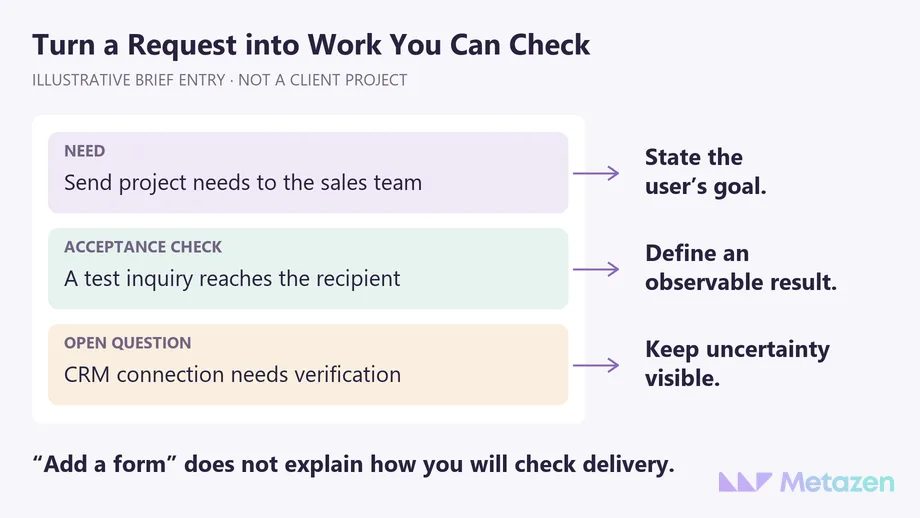
You need not prescribe a detailed technical solution at the first meeting. Explain the business condition that must be met, then discuss implementation with the technical team. If the requirement changes, record the decision and its effect on scope rather than silently replacing the earlier agreement.
4. Name the Content and Approval Owners
“We will supply the content” can hide several jobs: writing, checking facts, translating, selecting photographs and entering material into the site. Assign an owner and readiness status to each. Point to the actual file or folder the design team will receive.
MDN’s introduction to website planning considers content and visual assets before development. Existing logo files, usable photographs and a representative service description can support the first discussion. Do not assume all copy from the old site remains accurate; identify who will verify it as part of content maintenance.
Feedback needs an owner too. If sales, management and technical staff send conflicting edits in separate files, the designer cannot know which instruction to follow. Choose a project contact to reconcile comments and communicate the final decision. Label suggestions and approved changes so they cannot be mistaken for each other.
5. Agree Acceptance and What Happens After Launch
Which results must be visible before the site is accepted? Examples include approved content in the correct places, a form delivering to the intended recipient and a content owner able to update agreed fields. Approval of a visual mockup does not establish that those functions work.
Do not leave accessibility, performance and search requirements as vague adjectives. W3C’s accessibility planning guidance connects objectives with responsibilities. Agree what will be checked, by which method and by whom. A single automated test cannot serve as complete acceptance evidence. If an existing site is moving, include old URL mapping and post-launch search-access checks in the expected handover.
Do not turn an unverified integration into a firm delivery promise. If access, documentation or input from another system’s owner is pending, keep that dependency in the brief. Its effect on the schedule and proposal still needs assessment.
Include who will update content, manage account access and receive issue reports after launch. Detailed support terms can be settled in the proposal. Once you have shared the brief, use our guide to comparing web design proposals by scope to check whether the offers address the same work.
Let’s Turn Your Website Brief into an Agreed Scope
You do not need every answer before speaking with us. Your goals, available materials and open questions are enough to identify where the discussion should begin. Explore Metazen’s web design and development service to see how our design and development team can help shape a workable scope. We can discuss what the visitor needs to accomplish alongside how the website should look.

