

Your store has hundreds of products, but the time available for SEO will not cover every page in a month. Should you rewrite category copy, complete your busiest product pages or start with URLs receiving no visits? A useful order begins with the decision a shopper cannot yet make.
In ecommerce SEO, a category page helps people find and compare options; a product page helps them assess a particular item. Neither deserves first place in every store. Four checks bring search intent, missing information, commercial relevance and delivery requirements into the same decision. Our approach to turning search intent into content decisions provides the broader planning framework.
1. Match the Search Task to the Page’s Job
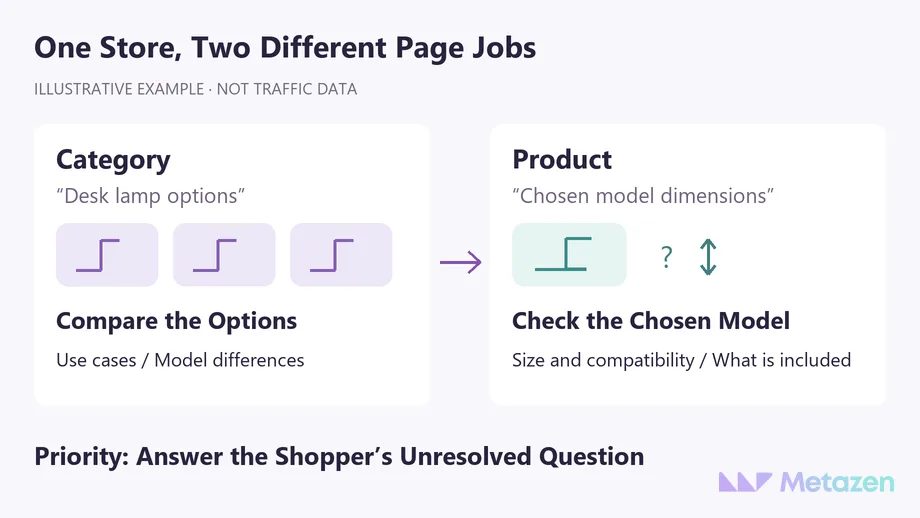
Someone searching for a desk lamp may want a range of options. Someone searching for a model name and its dimensions may already be checking whether that item fits their desk. A clear category is a sensible candidate for the first task; a detailed product page serves the second. The lamp store is a hypothetical example, not a measured search-demand or performance case.
Query length alone does not settle the choice. Inspect the page types appearing in your target market, questions from customers and your own search data. Using “lamp” on both pages is not a problem in itself. Investigate when the pages attempt to provide the same answer to the same need.
The query and page views in Search Console let you inspect which URLs appeared for a selected query. Keep dates, countries and devices comparable. If two URLs appear, review their roles before removing either one. An impression alone does not show whether a shopper found the answer.
Keep a short mapping record: shopping need, primary answer page, supporting page and unresolved question. “Adjustable desk lamp options” may belong to the category; the selected model’s reach and footprint belong in its product details. If a separate buying guide is useful, do not reproduce the entire guide on each product page.
2. Find the Missing Information That Holds Up a Decision
Can someone opening the category understand how the products differ? A grid of similar photos may lack useful grouping, intended uses or comparable attributes. Adding a long paragraph below the grid is not the only answer. Clear product names, sensible groups and a short explanation of the choices can be more direct.
The question changes on the product page: which model am I buying, how large is it, what is included and does it suit my needs? In the lamp example, an unknown base size is not resolved by expanding a sentence about stylish interiors. Obtain the verified dimension from the product owner and show it clearly, with an appropriate image where helpful.
Do not define the gap by a tool’s word-count warning alone. Google’s people-first content guidance says there is no preferred word count. Let unanswered buying questions determine the detail. Keep accurate manufacturer specifications intact and add useful explanations your business can substantiate.
Do not fill a product-information gap with a guess. Verify dimensions, materials, compatibility and use limitations with the responsible person. Fluent AI-generated copy is not evidence that the product has the stated feature.
Write the unresolved question in the task instead of “weak product description”: “Will the lamp base fit a narrow desk?” Acceptance becomes tangible: the page will show a verified dimension, its unit and the corresponding feature in the image. You can assess whether the information gap was closed.
3. Read Demand Alongside Available Products and Business Goals
The category with the highest search volume is not automatically your first project. Can customers buy the products, is the range current and are suitable models available for the visitor to explore? A lower-volume model query may represent a specific purchase decision. Read demand against the offer the store can actually fulfill.
A temporary stock gap and a discontinued product require different consideration. Deleting a URL because stock is unavailable, or redirecting every retired item to one category, should not be an incidental decision inside a copywriting queue. Review existing search interest, customer expectations and suitable alternatives separately.
If the page, source product record and Merchant Center data disagree on price or availability, resolve that inconsistency. Google’s product-data guidance describes mismatches caused by update timing. A stronger headline cannot correct an inaccurate stock status.
| Observed Situation | First Task | Reason |
|---|---|---|
| The category receives search exposure, but differences are unclear | Clarify selection information and product groups. | The shopper cannot choose a suitable model. |
| A specific model is searched for, but its size is missing | Verify the specification and complete the product page. | A fact needed for the purchase decision is absent. |
| Category copy is useful, but links do not reach the products | Investigate navigation and access. | More copy will not repair the missing route. |
| A high-volume category lacks a suitable product range | Resolve the offer and scope decision. | The business cannot yet meet the observed demand. |
The table is not a fixed scoring model. Several situations may apply to the same store. Recording the gap and the evidence behind its priority gives the team a more useful explanation than search volume alone.
4. Identify the Information and People Needed to Finish
Selecting the page is only part of the work. If the product owner must verify a measurement, the editor must explain it and a developer must add a field, name those tasks separately. An omission shared by the whole product template may need a common fix. A fact specific to one model should not be copied across the range.
Do not mistake writing for a remedy to an access problem. Google’s ecommerce navigation guidance emphasizes crawlable links from categories to products. Use the separate process for prioritizing technical SEO findings when the obstacle concerns access or implementation.
Structured data is technical markup that describes information to search systems. Review Product markup alongside the visible page. Adding it does not supply a missing dimension for the shopper to read.
Start with a small group of representative categories and products the team can verify and finish. Define acceptance before editing: accurate facts, clear content, working product links and a change record. Extend the approach to pages with the same needs after checking the result.
Review More Than Rankings After Publication
First check the delivered work: is the missing answer present, does the category show the correct items and has another model’s information been copied accidentally? Then compare the same page and query groups over time. Record promotions, seasonality, stock changes and other site work before attributing a change to the new copy.
The first report should say more than “ten descriptions completed.” Show which buying questions were resolved, which pages are waiting and why the next group was chosen. Search clicks and orders are separate measurements; an SEO report is not a sales ledger.
Choose a Practical First Group of Pages with Our Team
As the range grows, completing the right pages with verified information is a more manageable starting point than rewriting everything at once. Metazen’s content and technical SEO team can assess search needs alongside product facts and implementation requirements. Explore our SEO service to see how we can help define the first page group, responsibilities and acceptance checks.

