

An SEO audit with hundreds of warnings does not necessarily call for hundreds of separate development tasks. If six core service pages are accidentally excluded from search, polishing the descriptions of old blog posts is unlikely to be the best use of the next release. First establish which findings represent real problems. Then decide which ones cannot reasonably wait.
Technical SEO covers the infrastructure that lets search engines access pages, process their content and consider them for indexing. It sits alongside the content and link work involved in SEO. Technical decisions still need a business context: a useful audit should produce an ordered set of tasks with reasons, owners and acceptance criteria.
Confirm the Finding Before Adding It to the Backlog
A crawler can inspect many pages quickly, but it cannot independently know which service matters most to your customers. Screaming Frog explains in its guidance on issues, warnings and opportunities that priority labels need context. A high-priority flag can point to something worth investigating; it is not a complete instruction to a developer.
Open an affected URL, write down the expected behavior and reproduce the finding. Check when the evidence was collected. A noindex directive on a service page intended to appear in search is a problem. The same directive on a thank-you page may be deliberate. Noindex asks search engines to exclude a page from their index.
Do not remove every exclusion just to reduce the “not indexed” count. Google explains that not every URL should be indexed. Focus on the appropriate versions of the pages that need to be found.
If the evidence is incomplete, create an investigation task before prescribing a fix. An old crawl and a current page may describe different states. Establish why they differ rather than changing code to satisfy an outdated report. If you have not yet set a wider SEO plan, our article on choosing your first SEO priorities puts technical checks in context.
1. Business and User Impact: What Does the Problem Prevent?
Start with the consequence. Can customers use the page? Can Google access its main content? Where does the affected page sit in the path to an inquiry or sale? A core service page repeatedly returning a server error warrants a different response from a missing image URL that is no longer used.
Google’s minimum technical requirements concern access, a working page and indexable content. A confirmed obstacle to an essential page being considered for search can therefore take precedence over smaller presentation improvements. Meeting the requirements does not guarantee rankings; it removes a barrier to eligibility.
Describe the business risk without inventing a revenue forecast. If the evidence shows that six service pages are unavailable, say that. A claim that the business is losing 20% of sales needs separate support. A broken inquiry form can be urgent for customers and the business, too, without being presented as a direct Google ranking factor.
2. Affected Pages and Templates: How Far Does the Cause Reach?
Hundreds of affected URLs can share one cause in a page template: the common structure used by a set of product, service or article pages. Grouping findings by that cause avoids commissioning the same fix repeatedly.
For example, an incorrect canonical declaration on 240 product pages is different from 240 retired URLs returning “not found.” A canonical declaration identifies the preferred address among similar pages. A 404 response on a retired address may be intentional. Read HTTP status codes in the context of what each URL is supposed to do.
Record the total affected count, page type, examples and the sample you actually checked. Testing three products does not establish that every product behaves identically. Nor do thousands of low-value URLs automatically outweigh one essential service page. Reach has to be interpreted alongside impact.
3. Implementation Effort: What Will the Fix and Its Checks Require?
A “five-minute change” often describes only the edit. A realistic estimate includes investigation, implementation, testing, release and a way to reverse the change if necessary. What looks like a CMS setting may turn out to involve a shared plugin or caching behavior.
Small, medium and large estimates can be enough to start the discussion. Write down what each estimate covers: “One template change, followed by checks on both language versions and the inquiry form.” If the cause is unknown, scope the investigation instead of promising a precise completion date.
Quick fixes can keep work moving, but they should not become a reason to postpone a serious problem indefinitely. When two tasks have comparable impact, lower effort may justify doing one first. An access failure does not become less urgent because the fix is difficult.
4. Dependencies: What Has to Be Decided or Completed First?
You may know the desired result without being ready to implement it. If URLs are changing, the new address list needs to be settled before the final redirect mapping can be approved. If a template is being rebuilt, check whether a change to the current version would survive the next release. Once the move is agreed, plan migration URL mapping and launch checks as explicit deliverables.
“Waiting for development” is too vague to manage. Name the decision or task, its owner and the work it enables. “Apply redirects after the product URL list is approved” gives the dependency a clear boundary. If a serious access problem is active, discuss whether a safe temporary intervention can reduce the harm while the full solution is prepared.
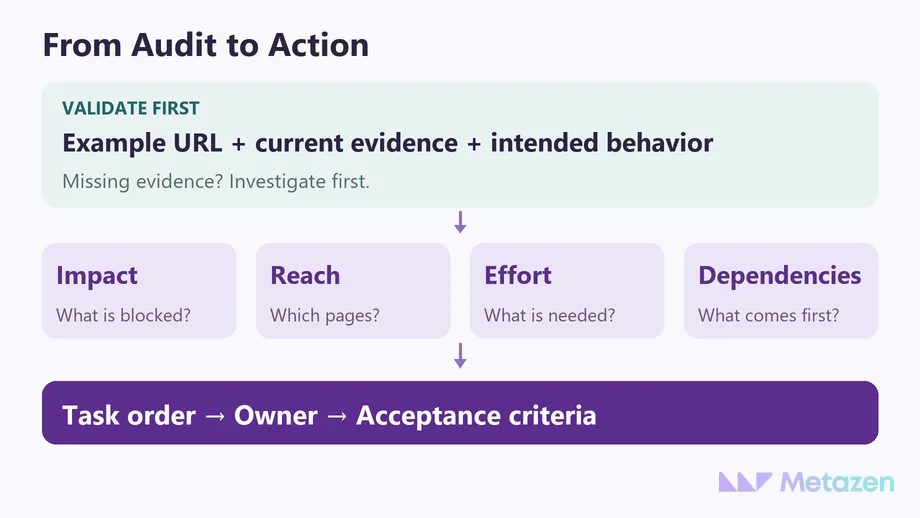
Use the Four Criteria to Agree on the Next Action
The examples below are hypothetical. They show how to discuss competing tasks, rather than assign permanent scores to error names. Serious access failures and losses affecting essential pages need early attention. Reach, effort and dependencies help distinguish the order of tasks with more comparable impact.
| Confirmed Finding | Context for the Decision | First Task |
|---|---|---|
| 6 service pages with unintended noindex | Pages need to appear in search; a shared template and clear cause | Correct the template, check the affected pages and preserve intentional exclusions elsewhere. |
| 120 product pages loading slowly | A significant product group; performance evidence exists, but the shared cause is unconfirmed | Investigate representative pages, then schedule the verified common fix. |
| 80 retired URLs returning 404 | Some removals are intentional; internal links and suitable replacements need review | Identify broken links from current content instead of redirecting every address to the homepage. |
| 20 long meta descriptions | The text is clear and pages are accessible; length exceeds a tool threshold | Review the search promise editorially; the count alone does not put the work ahead of access problems. |
For the Core Web Vitals report, Google recommends addressing “Poor” issues first, then considering the most affected or most important URLs. That is guidance for a performance report, not a universal scoring formula for SEO work. Our article on website performance and real-user data explains the measurement side in more detail.
Write a Task a Developer Can Implement and Close
“Fix technical SEO” leaves the deliverable undefined. The person receiving the task should not have to rediscover the problem, guess the intended outcome and decide alone what counts as finished.
- Finding and evidence: Which URL showed the problem, on what date? Where is the response, capture or crawl record?
- Scope and purpose: Which templates are affected, and how should the pages behave?
- Implementation: Who owns the task, what access is required and which dependency must be resolved?
- Acceptance criteria: What checks will confirm completion, and which examples will be used to look for side effects?
For the unintended noindex example, “the SEO score increased” is not a sufficient acceptance criterion. You can verify that the directive is removed from the six specified pages, that the pages work, and that intended exclusions elsewhere are preserved. Google recrawling and indexing the pages remains a separate outcome to monitor.
When commissioning an audit, agree who will implement its findings. A report-only engagement and a service that includes development and verification have different deliverables. Check implementation and acceptance responsibilities when comparing the scope of SEO proposals.
Separate Technical Acceptance from Search Performance
After release, check the technical outcome first. Do the example URLs return the expected response? Are their content and links accessible? Do the necessary customer interactions still work? Google’s guidance for developers highlights why what you see in a browser may differ from what a search engine can process. If the review covers AI search crawlers, check request identity, permissions and the actual response separately.
Distinguish the indexed-version information in Search Console’s URL Inspection tool from its live test. A live test checks certain conditions on the current page. Passing it does not prove that Google has selected the page or will rank it higher. Record the release date and monitor the relevant pages and queries separately over the following period.
Turn Your Audit Findings into a Workable Plan
If you have an audit but no agreed starting point, Metazen can help connect the technical findings with customer journeys and business goals. Our SEO and development team can clarify the scope, implementation responsibilities and checks needed for the work. Explore our SEO service to see how that support could fit your site.

