
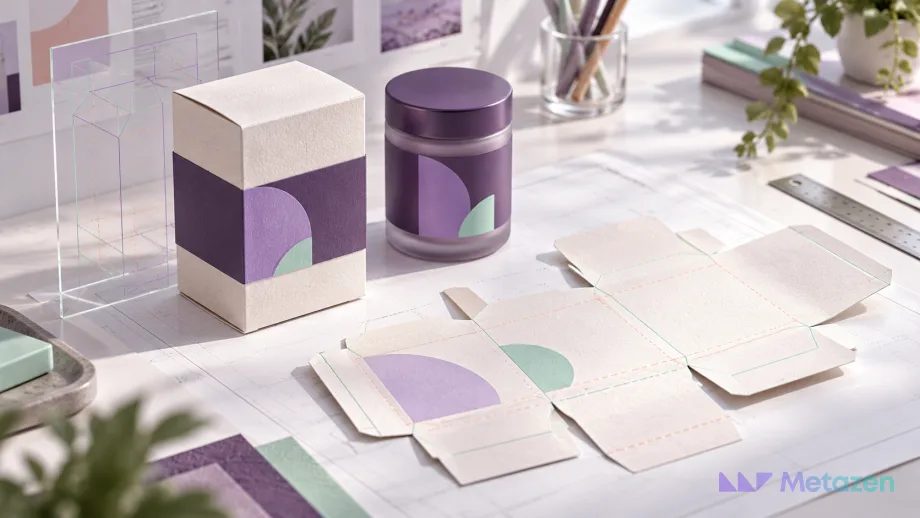
The box artwork is approved, then the manufacturer asks for different dimensions. The label looks balanced on screen, but its main text wraps around the side of the container. Some late design changes begin with product and production details that were missing from the original brief.
A packaging design brief defines what needs to be designed and the conditions it must work within. A logo, a color preference and a folder of references are only part of the input. Product information, manufacturing requirements and approval responsibilities need to meet in one place. Our print design project guide covers the broader production workflow; the focus here is preparing the inputs for boxes and product labels.
Explain Where and How the Product Will Be Used
Will the package sit on a shelf, travel by parcel or remain inside another box? How will someone hold it and read the label? The designer needs to understand the customer-facing surface, not just a rectangle on an artboard.
Provide a physical product sample if possible. Otherwise, combine measured photographs, several views and the manufacturer’s drawing. “Medium jar” is not an adequate specification. Container volume alone does not define label width and height. Avery’s explanation of label shapes illustrates how container form and label choice are connected.
Record use conditions as questions for the right supplier: Will the surface face moisture or abrasion? Will labels be applied by hand or machine? Have the manufacturer confirm material and adhesive suitability instead of leaving the designer to assume it.
Confirm Dimensions and the Dieline with the Manufacturer
A dieline is a flat technical drawing showing where packaging will be cut, folded and glued. It establishes where the artwork belongs. A mockup visualizes the finished package. They serve different purposes and require different kinds of approval.
Request the current dieline for the chosen structure, with a clear version, scale and unit of measurement. Ask whether box dimensions are internal or external. Do not stretch the template to make artwork fit. PakFactory’s artwork specification, for example, requires its template dimensions and orientation to remain unchanged and artwork to sit separately from the dieline. Your own manufacturer’s approved specification governs your project.
Do not assume that cut, fold and bleed colors form a universal standard. Read the supplier’s line legend. A red line used for folding in one file does not prove that another supplier uses the same convention.
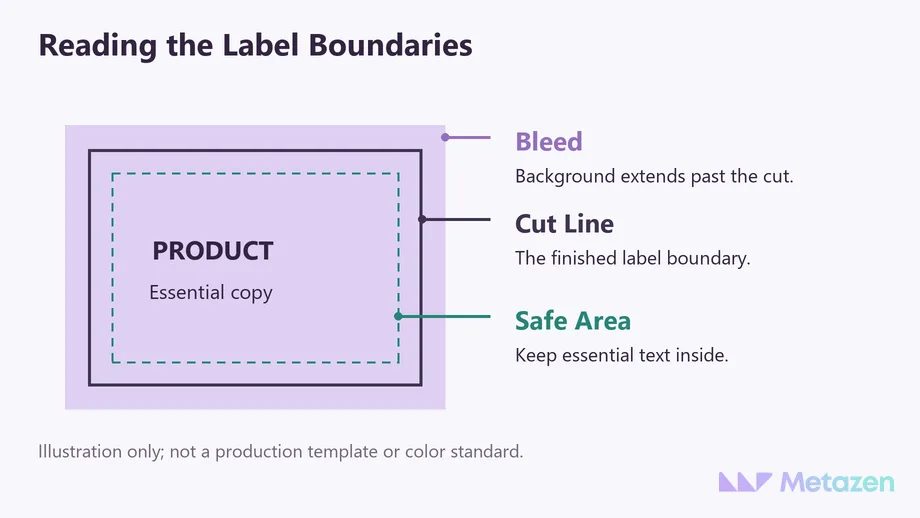
Bleed extends the background beyond the cut boundary. The safe area keeps essential text and marks away from the edge. Adobe explains that the required bleed depends on the job. Record the manufacturer’s allowances instead of treating one millimeter or inch value as suitable for every package.
Connect Material and Print Decisions to the Artwork
A clear label, matte paper and a metallic surface will not produce the same appearance. Supply color references alongside the selected surface and any special finish. Foil, embossing or a spot varnish may look like a small addition to the design, yet require separate production preparation.
Esko’s packaging prepress overview connects structure, color, file checks and proofing within the production process. As the client, you do not need to know every technical setting. You do need to know which decisions are still open and who will resolve them.
If the material has not been selected, say so. Record that a sample is pending and that color approval will follow the agreed proofing process. A clear open question is more useful than a specification that quietly assumes the answer.
Keep Product Copy and Variants in a Single Source
If a product comes in three sizes and two scents, establish how many artwork versions are required. A variant is a version distinguished by size, color, contents or another product attribute. Put each product code and its changing details in a separate row rather than scattering updates across email threads.
| Input | What to Supply | Who Confirms It? |
|---|---|---|
| Product and variants | Product code, name, size and version-specific copy | Product owner |
| Structure and material | Approved dimensions, template version and surface specification | Manufacturer and product owner |
| Brand assets | Vector logo, color references and usage rules | Brand owner |
| Copy and codes | Approved text, barcode artwork and any variable-data areas | Relevant content approver |
| Delivery and approval | Required files, proofing scope and final decision-maker | Designer, manufacturer and client |
Do not ask the designer to invent required product statements or sector-specific claims. Supply copy reviewed by the appropriate people for the market where the product will be sold. Keep design approval distinct from approval of the information itself. A change to product copy needs another check of the affected artwork.
Reserve barcode space early. GS1’s placement guidance explains why surrounding clear space and print conditions affect scanning. Supply artwork for the correct code and avoid distorting it to fill a gap. Have its dimensions and placement checked against the requirements of the barcode being used.
Use References to Explain Direction, Not Request a Copy
“Premium but simple” can mean different things to different people. Explain what the customer should notice first: the product type, variant or brand. Annotate references with observations such as “The variants are easy to distinguish” or “The front panel keeps the information brief.” Mention what would not suit your product, too.
Supply the logo with the visual rules for the brand. If a new logo is part of the project, do not treat it as a minor packaging revision. Settle the logo design brief first. If guidelines already exist, review their practical usage rules and clarify any packaging decisions they leave open. The package should feel like part of the brand while making product information easy to read.
Know What Each Mockup, Sample and Final File Approves
A three-dimensional view helps assess front and side panels together. Adobe’s packaging visualization approach uses that ability to explore design options. The image alone does not establish that the box fits the product or that the label adheres to the chosen surface.
Approve a named file and version. “The purple one is fine” leaves room for confusion. Identify the variant, copy and type of proof being approved so the next change has a clear review path.
When requesting a design quote, list the original designs, variant adaptations and delivery files you expect. Clarify whether structural work, photography, copy preparation, samples and manufacturing are included. A complete brief does not guarantee a particular price; it lets suppliers quote against a shared description of the work.
Get Your Packaging Brief Ready for Design
At Metazen, we connect visual decisions with the brand and the setting in which the design will be used. Our graphic design team can help clarify missing inputs, variant scope and delivery expectations once product and manufacturing requirements are available. Explore our graphic design service to see how we can help prepare your box and label project.

