

When a customer follows an old Google result after your new website launches, where do they land? Can they still find the service details, or do they have to start again on the home page? Reducing SEO risk during a website migration starts with that journey, before the design is signed off. Addresses, content and search access need a place in the project plan.
A migration may change the domain, page addresses or hosting infrastructure. Each has different implications. If the proposed scope is still unclear, first decide whether the website needs a redesign or targeted fixes. The five checks below concern the search requirements of a move you have already decided to make.
1. Record What Will Change and What Must Be Preserved
Replace “migrate the website” with a description of the work. Are you changing domains, introducing new paths on the same domain, or replacing the content management system? A hosting move may preserve every public URL. Google’s guidance for moves without URL changes focuses on correct delivery from the new infrastructure and monitoring the traffic transition.
Compare a crawl of the current site with CMS records, sitemaps and available search data. Pages outside the navigation can still receive visits. Images and downloadable documents may need a destination too. Starting with only the pages approved for the new design leaves you without a decision for some existing links.
For each address, record its purpose, content to retain, planned change, content owner and available organic search data. Low traffic does not automatically mean low value: an installation document might serve a small number of customers with a specific need. A content inventory used for website structure planning is a useful starting point. The migration record adds a decision about each existing address.
Save a dated baseline before launch. Record which page groups receive search visits, how inquiries are measured and which problems already exist. If tracking was incomplete on the old site, a different count on the new one is not enough to establish an SEO loss. The baseline should help the team investigate a change, rather than produce a flattering before-and-after chart.
2. Match Old URLs to Pages That Answer the Same Need
A URL map is a set of content decisions. When a service continues at a new address, the destination should provide its details and next step. If several pages are consolidated, check that the new page actually answers the questions the old pages covered. Similar-looking paths are not evidence of equivalent content.
For example, an old maintenance service page should lead to the corresponding maintenance page, with the relevant scope and inquiry route intact. Sending every retired address to the home page is not a satisfactory way to declare that nothing is broken. Google’s site migration guidance warns against irrelevant bulk redirects. Content intentionally removed without a suitable replacement needs a separate decision about a proper 404 or 410 response.
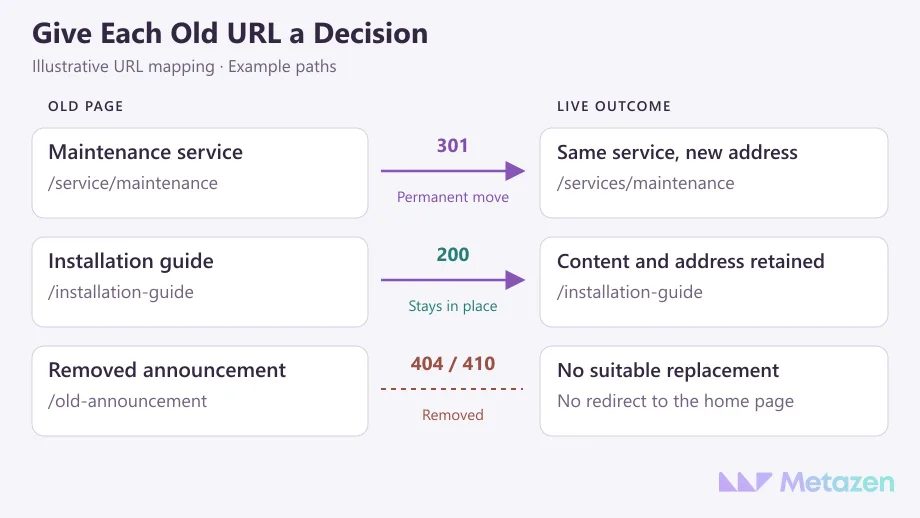
Reaching the right address is only part of the job. Has the new layout lost the service scope, practical examples or information a customer needs before contacting you? Review consolidation by identifying the question each page should answer. A cleaner screen should still give visitors the information they came for.
For a permanent move, use permanent server-side redirects such as 301 or 308. Ask the technical team to show the rule and its actual result. Record unnecessary intermediate hops, redirect loops and wrong destinations as separate findings; “a redirect exists” is too vague to close the task.
3. Check Search Access and the Preferred Page Address
A page opening in your browser does not establish that a search engine can use the same content. For pages intended to appear in search, ask the team to check the HTTP response, accessible main content, indexing instructions and preferred-address signals together.
Temporary staging restrictions deserve a specific check. A noindex instruction can appear in the HTML or an HTTP header. Robots.txt controls crawling instead. If Google cannot access the page, it may not see the noindex instruction. Treating those settings as interchangeable can hide the problem you meant to solve.
Remove accidental staging blocks only where public indexing is intended. A migration is not a reason to expose an admin screen, private customer area or other deliberately restricted page. The checklist should identify which pages are supposed to become publicly available and eligible for search.
A canonical annotation signals the preferred address among similar pages. The new page should not accidentally nominate the old domain or a staging address. Check consistency between canonical annotations, internal links and sitemaps, and review language counterparts when multilingual addresses change. A declared preference does not guarantee that Google will select it.
If a problem appears across a page group, establish the cause and reach before estimating the fix. One incorrect instruction in a shared template can affect many records. Use business impact and dependencies to prioritize technical SEO findings. A launch deadline does not turn a verified access problem into an acceptable result.
4. Verify the Actual URLs at Launch
A successful staging test does not prove that production redirects work. Run the mapping against the live addresses: what status does the old URL return, where does it finish, and what content appears there? An HTTP 200 response can confirm a successful response; it does not prove that the correct content was served or indexed.
Combine bulk URL checks with a human review of representative templates. Depending on the site, that may include service, product, category, article and language variants. An automated check can miss a technically successful redirect to the wrong service. Put the expected destination beside the observed destination in the handover record.
For a domain move, review the requirements of Search Console’s Change of Address tool. It applies to eligible domain or subdomain moves after redirects are in place, rather than a path change within the same domain. Submitting a new sitemap does not replace testing the old addresses.
Keep the live test separate from the indexed record. URL Inspection can report on the version Google knows and test a current URL. A successful live test of the final destination does not establish that the new version is indexed or that its rankings have been preserved.
5. Assign Monitoring, Corrective Work and Rollback Decisions
Keep the project open after launch. Name the person who monitors access errors, the person who reviews search performance and the developer who receives confirmed findings. Agree on a review schedule that fits the scale and risk of the move. A single monitoring period will not suit every website.
Review old and new page groups together. Falling clicks on the old address with growth at its replacement are different from a loss across both. Google’s traffic-drop investigation guidance examines affected pages and queries over comparable periods. Note seasonality, tracking changes and simultaneous content edits before assigning a cause.
| Observation | First Check | Decision to Record |
|---|---|---|
| An old service URL leads to the wrong page. | Compare the actual destination with the approved map. | Approve the correct target and repair the redirect. |
| The new page opens but its main answer is missing. | Compare the published page with the approved content. | Assign the missing content and its verification to an owner. |
| Search clicks have fallen without a clear access error. | Examine the affected pages, queries and comparison period. | Investigate before reversing every project change. |
| Important pages show widespread server errors. | Review error logs and the new release’s server behavior. | Have the technical owner assess the agreed recovery or rollback procedure. |
“We can put the old site back” is not a complete rollback plan. Which release would be restored, who authorizes it, and what happens to records collected since launch? A ranking fluctuation and a technical failure that makes the site unusable should not trigger the same automatic response. Repeatedly changing destinations can add another problem to investigate.
At Metazen, we prefer to define technical handover through assigned work and evidence of completion. In a website project brief, replace a vague promise to “preserve SEO” with the URL inventory, approved mapping, launch checks and monitoring owner. The business and implementation team can then discuss the same deliverables.
Plan Your Website Move with Our SEO and Development Team
If launch is approaching and the future of your old pages is still unclear, we can begin by reviewing the existing addresses and the proposed changes. Metazen’s team combines technical SEO and software development experience to assess the implementation and follow-up work together. Explore our SEO service to discuss how URL mapping, technical review and post-launch monitoring could fit your project.

