

The warehouse spreadsheet says 12 units are available. Sales has a copy showing eight. Someone has to search email attachments and messages before confirming the next order. Replacing Excel with custom software starts to make sense when resolving that kind of conflict becomes part of the daily workload. Before commissioning an app, find out why the disagreement keeps happening.
Spreadsheets are useful for calculations, lists and analysis. An operational application has a different job: make a record follow agreed rules. It might assign a request to a reviewer, prevent an unauthorized change or stop an unapproved order from reaching the warehouse. Custom software differs from an existing product because its behavior is developed around the required process. Untidy files alone are not a reason to commission it.
Test the Working Process Before Replacing Excel
If nobody owns the master file and every email creates another copy, start with the working arrangement. Choose an authoritative file, use consistent item codes and assign responsibility for updates. Where inconsistent status names are the problem, data validation lists and input restrictions can help. They will not establish whether every entered fact is correct.
Having several people work on a workbook does not automatically justify a replacement. Microsoft supports Excel co-authoring with compatible versions, files and storage. Check the requirements against your team’s setup. Being able to share a workbook is a separate question from controlling which records each employee may change.
Describe the failed task before choosing the tool. “Our sales list does not reflect warehouse changes, so we reconcile both lists every morning” gives a developer something to investigate. “We have outgrown Excel” does not explain what the replacement must fix.
1. The Same Record Has Competing Versions
Inventory, customer or work-order details may be updated in several files. Why were the copies created? Perhaps employees cannot reach the master workbook. Perhaps sales and fulfillment are trying to change different facts in a column with the same name.
Try removing unnecessary copies and observe whether the conflict disappears. If it persists, identify where each fact is maintained. Sales might own the quantity ordered while the warehouse records the quantity shipped. Combining both under “quantity” and overwriting one with the other is a data design problem before it is a software choice.
An application becomes a stronger option when the process needs related records, controlled updates and an agreed response to conflicting changes. Ask a prospective provider to demonstrate two people working on the same order. Which change is accepted? What does the other person see? How is a mistake corrected? A clean list on a demonstration screen does not answer those questions.
2. File Access Does Not Match Job Responsibilities
A sales representative may need access to assigned customers, a warehouse employee may update shipping quantities, and a manager may approve discounts. “Who can open the file?” covers only part of that arrangement. Permissions must account for the action and the record involved.
Do not treat hidden columns or locked cells as a security boundary. Microsoft states that worksheet protection is not intended as a security feature. Preventing accidental edits to a formula can be a useful purpose; preventing access to another customer’s record requires a different control.
Application platforms such as Dataverse support role and record access rules. The availability of that feature does not prove that your rules have been configured correctly. Use separate accounts during a demonstration: the authorized employee should complete the action, while an unauthorized employee should be blocked even when attempting another route to the record.
Custom software is not automatically more secure. Access controls, backups and change history need deliberate design and verification. Ask which actions are logged; for example, Dataverse auditing coverage depends on the relevant settings.
3. Work Status Lives in Colors and Messages
A yellow cell means “awaiting approval.” The name of the approver, the reason for the delay and a request for missing details are buried in a chat thread. Anyone opening the spreadsheet can see a status but still has to call someone to find out what happens next.
For a small, straightforward process, a clear status list and an assigned owner may be enough. A workflow is more demanding when requests must go to different reviewers, actions must wait for approval, or rejected requests need a recorded reason. It defines the conditions under which a record can move forward.
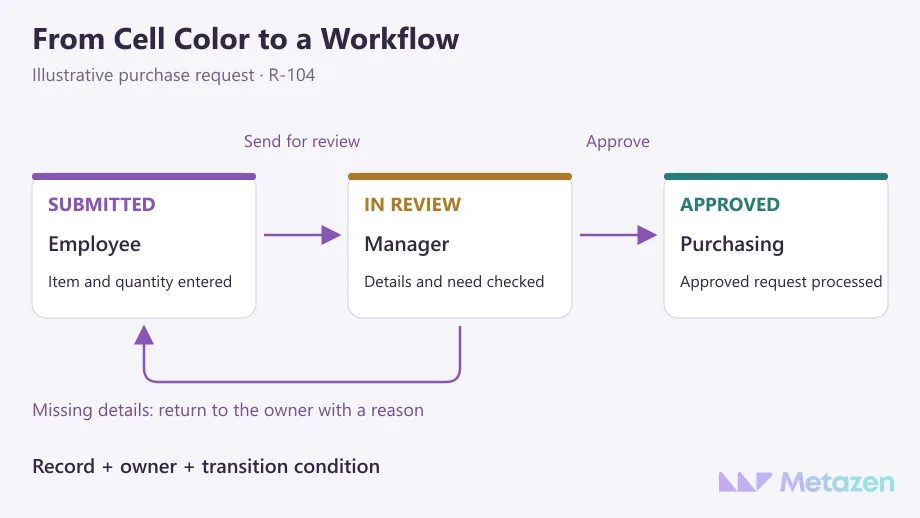
Consider a purchase request. An employee enters the item and quantity, then a manager reviews it. Missing information sends the request back to its owner. An application should do more than display three screens: it should prevent an unapproved request from reaching purchasing and show the pending work to the right person. Test incomplete, rejected and amended requests alongside the successful example.
4. People Re-Enter the Same Data in Several Systems
An order starts in a sales system, gets copied to Excel and is entered again in accounting. Before replacing the entire arrangement, investigate why each copy is needed. A supported connection between existing products may remove the duplicate work.
An API is an interface through which applications exchange data using defined operations. Decide which records travel in which direction and how changes or cancellations are handled. Planning the data owner and integration flow helps separate a missing connection from a need for new business software.
Adding automation around a workbook has its own constraints. The Excel Online (Business) connector, for example, does not support simultaneous file writes from multiple clients. That limitation belongs to the connector; it is not a blanket restriction on normal Excel co-authoring. Ask the technical team to demonstrate what happens when an employee edits a record while an automated update is waiting.
Custom Development Is Only One Possible Response
Recognizing a warning sign does not establish that existing products are unsuitable. Your team may need standard inventory or request management. If you are considering a subscription tool, examine how a SaaS service divides usage and operating responsibilities. Custom development enters the comparison when necessary business rules remain unmet.
| Observed Problem | First Improvement to Test | Required Application Behavior |
|---|---|---|
| Emailed copies drift apart. | A supported shared workbook with one update process. | Handle conflicting changes according to agreed rules. |
| An employee overwrites a formula. | Separate input fields and use appropriate cell protection. | Where required, enforce permissions by person, record and action. |
| Nobody knows who owns a pending request. | Clear status names and an assigned owner. | Enforce approval conditions and return incomplete requests with a reason. |
| An order is typed into three systems. | Check the existing products’ supported transfer options. | Run the necessary connection with defined error and correction handling. |
Importing a spreadsheet is not the same delivery as making the full process work. In Microsoft’s options for creating an app from Excel data, the workbook can remain a data source or its data can be imported into Dataverse. Ask where records will actually live. A new interface may still depend on the old workbook.
Try the Decision on One Complete Workflow
Choose a bounded task, such as taking a request from submission to approval. Record where people re-enter data, what causes delays and how mistakes are corrected today. Run the same example through the proposed solution, including missing or incorrect information. Do not put a precise time-saving claim in the business case before measuring it.
Agree which system will hold the authoritative record, who may update it and what the old workbook will be used for. Excel exports may remain useful for analysis. An independently maintained operational copy, however, can recreate the original conflict. If the trial confirms a development need, document the workflow and acceptance conditions before requesting quotes.
Compare more than the development fee. Licensing, maintenance, data preparation and the team’s handover responsibilities affect the decision. Resolving unclear scope in software estimates lets you compare options for the same job. The principle of testing technology choices with prototypes is useful here: establish that the proposed approach works before making a larger commitment.
Work Through Your Spreadsheet Bottleneck with Our Developers
At Metazen, we start with the task an employee needs to complete, then consider the screens and data behind it. An example with sensitive details removed can help us examine conflicting files or approvals managed through messages. Talk to our team with database and application development experience about the changes your process needs, and explore how our custom software service takes an agreed requirement through to implementation.

