
Someone clicks an office renovation ad and arrives at a page full of attractive interiors. They still cannot tell whether the company provides design, construction or both. Asking for a quote feels premature. Landing page design starts by resolving that uncertainty, before deciding how large to make the button.
A landing page is the page a visitor reaches after following a link, such as an advertisement. Google Ads defines it by that destination, not by a compulsory layout. An existing service page can do the job. A page built for a particular campaign brings the information needed to evaluate one offer and take the next step into a focused experience.
A homepage serves several audiences and introduces different parts of the business. A campaign page answers a narrower question: “Can the company meet my needs, and how do I start a conversation?” For the broader relationship between appearance and use, see what web design needs to accomplish. The following five decisions help turn the offer into a workable page brief.
1. Decide Which Offer Visitors Should Understand First
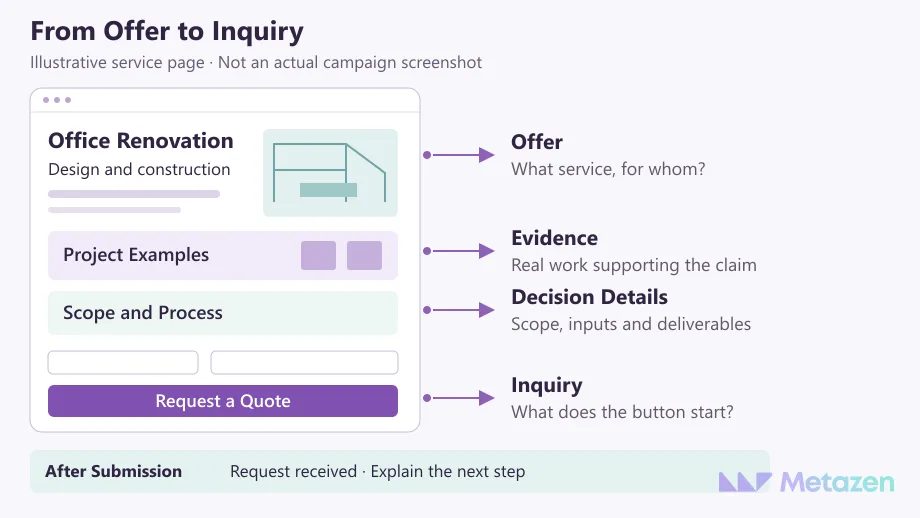
Before drafting the headline, describe why the visitor is arriving. Consider a fictional company that renovates offices. The immediate goal is to help a business owner request a project discussion, rather than introduce every architectural service the company could provide. The headline, supporting copy, image and button should describe the same job.
“Transforming spaces” might express the brand’s outlook, but it leaves the service open to interpretation. “Office design and renovation planning” gives the visitor more to work with. A short explanation can clarify the service area and the information needed before a quote is prepared. If the company provides design only, the page should not imply that it manages construction.
| Vague Wording | The Visitor’s Question | Information to Provide |
|---|---|---|
| Solutions tailored to you | Which parts of the job do you handle? | Whether design, construction and project coordination are included. |
| Get an instant price | Will I receive a fixed price after submitting? | The actual discussion or assessment required before a quote. |
| Projects of every size | Would you take on my project? | The service area, project types and scope the company considers. |
The table is an illustrative copy review, not a real client offer. Keep unsupported services and response promises out of the final text. Google’s ad and landing page guidance stresses consistency between the promise and its destination. If the campaign itself is still being defined, plan search intent, the offer and the destination together.
2. Choose Evidence That Supports the Claim
A stock photo beside “excellent workmanship” does not demonstrate workmanship. A detail from a completed project, the relevant specialist’s experience or a clear description of the deliverable may answer a more useful question. Place evidence near the statement it supports.
For the office example, explain which work the company performed. If another contractor completed construction, do not present the finished interior as proof that your team delivered every part of it. Customer feedback should retain its real meaning and approved context. One project’s outcome does not establish what every future customer will receive.
Give the image an honest role. A project photograph documents work; a conceptual illustration explains an idea. Do not present a generated interior as a completed customer project or add success percentages without supporting measurements.
If you have no approved case study to share, explain the working process and show an illustrative deliverable with that status made clear. Invented client logos cannot fill the gap. The reader needs enough evidence to judge the service, not a badge attached to every sentence.
3. Arrange Information Around the Buying Decision
Do not choose page length by copying a competitor’s screenshot. Start with the questions that recur in real sales conversations: what is included, what must the customer prepare, what will the team deliver, and how is a quote produced? Information that changes the decision should be available before you ask the visitor to commit.
A straightforward service might need an offer, relevant work, scope and an inquiry route. A project requiring technical assessment may need more explanation of the process and dependencies. Give a ready visitor an early route to the form while allowing someone with unanswered questions to inspect the detail first.
Simplifying the page does not mean removing every useful link. Section links to scope or project examples can help on a longer page. Google’s explanation of landing page navigation emphasizes helping visitors reach the information they wanted. Make navigation decisions around that task, rather than applying a blanket “no links” rule.
4. Make the Call to Action Describe the Actual Action
A call to action, or CTA, invites the visitor to do something specific. “Request a Quote,” “Request a Demo” and “Choose an Appointment” set different expectations. A form that does not let someone select a time should not imply that an appointment is confirmed. Nearby copy can explain what will happen next.
Several buttons can lead to the same inquiry. Introducing a different offer or transaction in every section asks the visitor to reconsider the purpose of the page. Keep the main action recognizable. Supporting links, such as reviewing the scope, do not need equal visual prominence.
Ask for the information needed to begin the conversation. If project type determines who should respond, explain that purpose. Do not require later-stage details merely because the template includes a field for them. W3C’s guidance on form labels explains how to make each control’s purpose clear. Placeholder text that disappears during typing is not a reliable replacement for a visible field label.
If inquiries already arrive but do not fit the service, resist treating form length as the entire problem. Review lead quality alongside traffic, the offer and sales feedback to distinguish a page issue from a gap elsewhere in the process.
5. Define What Happens After Submission
The design includes the state after the button is pressed. A visitor should know which field needs correction or whether the request was accepted. W3C’s form notification guidance calls for understandable feedback on both success and failure.
For the fictional renovation company, a confirmation might explain how the project coordinator will begin the conversation. “We will call within an hour” belongs there only if the business can honor it. Ask for submitting, error and success states alongside the empty form in the design handoff.
A button click is not a completed inquiry. Check that the event being counted represents the request the business receives. A success message alone does not prove that the inquiry reached its intended recipient.
Define the records for a submitted form, suitable lead and completed sale in the advertising conversion tracking plan. When reviewing the page, keep the traffic source and offer in view. Changing a button color will not resolve a visitor’s mistaken expectation about the service.
Prepare a Brief the Design Team Can Use
Bring the offer, intended visitor, approved evidence, scope, inquiry route and follow-up owner into one brief. Keep missing photographs and unapproved promises visible as outstanding inputs. If the work covers a larger website, the website project brief helps assign responsibilities beyond the campaign page.
Make the handoff review more concrete than a visual approval: can visitors find the advertised offer, is the evidence accurate, are error and success states defined, and does the request reach the right person? Before campaign launch, review the destination URL and measurement alongside the steps for creating a Google Ads search campaign.
Let’s Plan a Landing Page Around Your Offer
At Metazen, we treat the page design and the advertising promise as parts of the same project. We start with what the visitor needs to understand and complete, then define the design and development work around that task. Explore our web design service to see how our team can help with the content, interface and inquiry flow of your landing page.

