

The monthly report may show more clicks, lower costs and plenty of green arrows. The business owner can still leave the meeting wondering what the advertising budget achieved and what the team will do next. A useful agency report shows the evidence for increasing the budget, fixing measurement or completing sales follow-up.
An advertising report presents activity and spend for a defined period alongside the campaign’s intended outcomes. Impressions, clicks and conversions describe different events; the basics of digital advertising explain the distinction. You do not need to become a platform specialist to review the report. Start by asking what each number represents, where it came from and which recommendation it supports.
1. Check the Period and the Objective
Establish the boundaries before interpreting the chart. Which accounts and campaigns are included? What dates does the report cover, and when was it prepared? A campaign intended to generate quote requests should not quietly switch to impressions as its main success measure because the impression count looks stronger.
A campaign launched halfway through the month has not had the same time to generate inquiries as a campaign that ran throughout the previous month. Check active days, service scope and the agreed objective before accepting a month-over-month total. Ask what stayed comparable, as well as what changed.
The preparation date matters separately from the reporting period. Google’s explanation of conversion delay describes how recent results can arrive later. Avoid treating an unfinished period as directly equivalent to an older period whose outcomes have had time to develop.
2. Establish Which Costs Are Included
Break down a statement such as “we spent $3,000 on advertising.” Platform media spend, agency management, creative production and setup work are different items. A single combined figure can hide the reason costs changed, even when every individual charge is legitimate.
Google’s third-party transparency requirements call for Google advertising costs to be distinguished from the provider’s own fees. Look for the currency and included items in your report. If the original scope is unclear, revisit the questions that separate Google ad spend from agency fees.
Account cost and the amount billed may differ. Google Ads distinguishes served cost from billed cost after adjustments such as invalid activity. Ask for the explanation before calling the difference an error, and keep the agency’s service charges separate from the platform figure.
If last month’s cost-per-inquiry calculation used media spend and the latest calculation includes management fees, the comparison has changed. Agree on the included costs and the outcome being counted before interpreting the movement. A more detailed spreadsheet cannot repair an undefined comparison.
3. Identify the Outcome Behind the Number
“We generated 40 conversions” is only useful once the action is named. Was it a submitted form, a click on a phone link, a completed call or a paid order? A heading labeled “customers” is misleading if the number underneath represents inquiries that have not yet been assessed.
Google Ads’ “Conversions” and “All conversions” columns have different coverage. The report should identify the column and the actions behind it; Google’s conversion-data documentation explains the distinction. When the event definition or counting setup is uncertain, use the conversion-tracking planning checks to establish what is being measured.
For a service business, sales records provide another view: which inquiries met the agreed requirements, which did not, and which have not been assessed? A pending inquiry is not a failed lead. A label such as “qualified” needs a stated criterion. If the question becomes why the inquiries are unsuitable, move into a separate lead-quality diagnosis rather than trying to settle the entire issue from the report total.
4. Check Whether the Comparison Is Fair
A social campaign’s cost per video view does not compete directly with a search campaign’s cost per quote request. The campaigns have different jobs and count different actions. Establish a comparable business outcome first; the decisions behind channel and campaign selection remain relevant when reviewing the results.
Ask for a short note when the budget, target area, offer or measurement setup changed during the period. Google Ads’ change history helps verify when account changes were made. If the underlying objective and delivery settings are unfamiliar, the Google Ads setup walkthrough with screenshots explains the role of the relevant fields.
When two sources disagree, ask about their definitions and date basis before choosing a preferred total. A record assigned to the date of an ad interaction may fall into a different period from a record assigned to the date the action happened. The report needs to state its basis before the difference is described as an agency mistake or a loss of performance.
An increase after an edit does not prove that the edit caused it. Demand, time in market and other settings may have changed too. Keep the observation, the possible explanation and the next verification task separate.
5. Look for an Action, an Owner and a Review Date
A closing line that promises “ongoing optimization” leaves the work undefined. Which finding will the team address, who is responsible, and when will it be reviewed? If the recommendation is to increase the budget, ask which evidence supports the increase and what remains uncertain.
When several inquiries have not been contacted, another budget increase may not be the first useful step. The sales owner can complete the assessments, while the agency confirms the campaign and measurement scope for the same group. Clear responsibilities reveal whose input is missing instead of leaving a vague request to “improve results.”
Record an implementation separately from an outcome. “Updated the service description” is completed work. “Reduced unsuitable inquiries” requires subsequent evidence. Leaving the settings alone while outcomes develop can be a deliberate choice, provided the reason and review date are written down.
Read a Short Example Before the Next Review Meeting
The figures below are hypothetical, independently constructed for the example. They are not client results, market prices or performance benchmarks. Imagine a monthly report that places campaign spend beside the sales team’s assessment of inquiries for the same service.
| Reported Item | Required Context | Decision It Supports |
|---|---|---|
| $2,400 in media spend | Account, period and included campaigns; service fees separate | Establishes which investment is being reviewed. |
| 32 inquiries | 14 qualified, 10 unsuitable, 8 awaiting assessment | Prevents inquiry volume from being read as sales. |
| 8 pending records | Sales owner, contact plan and review date | Completes the missing assessment before a budget decision. |
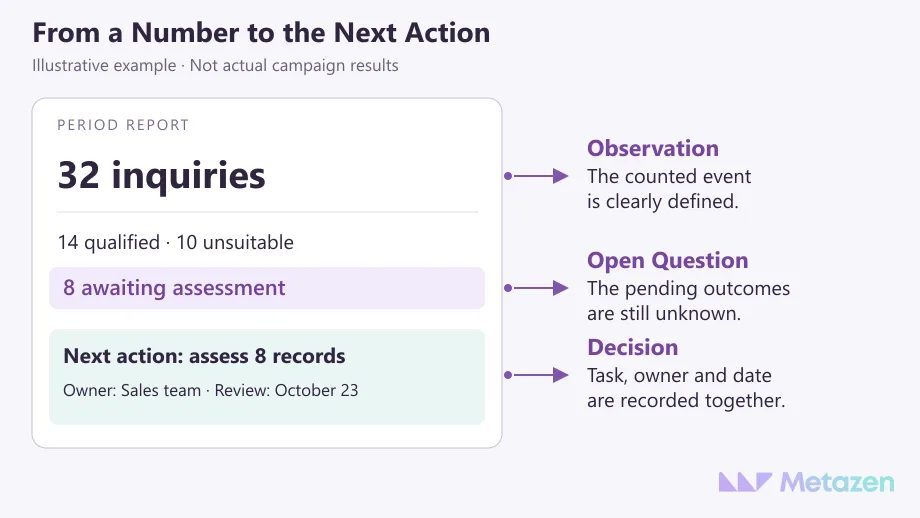
You do not have to leave the meeting with more charts. You should know which evidence supports the decision, which question remains open and what will happen before the next review. A PDF, spreadsheet or live dashboard is useful when it makes that work easier to follow.
Turn Your Advertising Report into a Practical Plan with Our Team
At Metazen, we review campaign reporting alongside the business objective and feedback on the inquiries received. Our performance marketing and technical team can help clarify which measures support your next decision. Explore our advertising management service to see how campaign management, measurement and reporting can fit into a shared work plan.

