

An order is approved in the sales application, then someone enters it again in the warehouse system. When inventory changes, the sales team still sees the old quantity. API integration becomes useful at that handoff. Before development starts, the team needs to agree which system holds the authoritative data and what happens when a transfer fails.
An API is an interface that lets software interact under defined rules. The initials stand for Application Programming Interface. MDN’s API definition distinguishes a software interface from the screen a person uses. An integration puts those interfaces to work: sending an order, reading inventory or updating a status.
If an existing application does its job but cannot share the necessary records, replacing it may be unnecessary. Comparing ready-made software, configuration and custom development helps separate a missing connection from the need for a new application. Once a connection is needed, use the following five questions to prepare its scope.
1. Which System Owns Each Piece of Data?
“Keep customers and orders in sync” sounds straightforward. It leaves a harder question unanswered: if a delivery address differs between systems, which version should survive? Identify the source for each field and who may change it. Data ownership includes the person responsible for correcting an inaccurate record, as well as the application that holds it.
Consider a fictional furniture retailer. Its sales application supplies the order and shipping address; its warehouse system supplies available inventory. If a warehouse employee corrects an address, should the change update the sales record automatically? If the first release simply alerts the sales team, write that down. Transfers in both directions do not require unrestricted editing in both systems.
The integration needs a stable way to recognize the same order across applications. A customer name or a row number that can change is not enough. The technical team should define the record mapping, while the business owner checks that it identifies the right order. If the workflow itself is unsettled, start with requirements preparation before requesting a software quote.
2. Which Fields Move, and in Which Direction?
A list of application names does not describe the connection. For each transfer, identify the source, destination and fields involved. An order can include a product code, quantity, shipping address and status. Those fields do not necessarily travel together or in the same direction.
| Information | Direction | Expected Result |
|---|---|---|
| Approved order and line items | Sales → Warehouse | One picking record is created for the corresponding order. |
| Available inventory | Warehouse → Sales | The sales application displays the inventory figure maintained by the warehouse. |
| Order cancellation | Sales → Warehouse | The order is cancelled before picking starts; later requests are flagged for a responsible person. |
| Shipping status | Warehouse → Sales | The sales team can see the shipping stage of the matching order. |
The table is a worked example, not a client deployment or a ready-made package. Its cancellation rule is an assumed business decision. Your operation may need a different rule. Four defined transfers do not imply that every field is continuously mirrored in both applications.
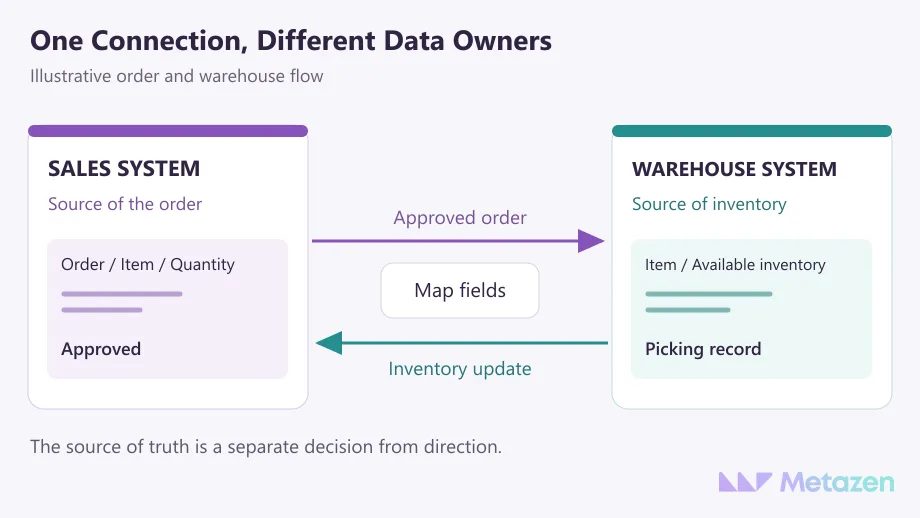
Compare field meanings, not just labels. “Stock” may mean the total on the shelf in one system and the quantity available to sell in another. Are products counted in individual units or cases? Does an empty value mean “unknown” or “clear the field”? Microsoft’s guidance on translating between systems explains why different data models can need a mapping layer. Your developers can choose the implementation; they should not have to guess the business meaning.
3. What Starts the Transfer, and How Much Delay Is Acceptable?
Should an order reach the warehouse when it is created, when payment is confirmed or when a sales manager approves it? Asking for “real-time integration” before settling that event can send an order for picking before it is ready. Start with the point at which the business wants work to proceed.
A webhook sends a notification when an event occurs. Polling checks for changes at intervals. The available options depend on the provider and the delay the workflow can tolerate. Inventory availability may need a different update schedule from an end-of-day report.
Turn “real time” into an acceptance condition: what delay is acceptable under the agreed conditions, where can staff see the last successful transfer, and what happens when a service limit is reached? Stripe’s webhook documentation, for example, explains that events may arrive more than once and are not guaranteed to arrive in order. Check the delivery rules of the provider you actually use.
Separate the initial import from ongoing updates. Should orders created before the connection went live be included? Define the starting point, open records and historical exceptions. A working connection can still leave the team with an incomplete opening list.
4. Who Grants Access, and Who Maintains It?
Collect the API documentation, product version, required subscription and the name of the person who can authorize access. An operation appearing in the documentation does not establish that your account may use it. For subscription applications, understanding the responsibilities of a SaaS provider and its customer helps direct those questions to the right party.
The connection should receive the permissions it needs. Sharing full account administration access just to read orders is a poor starting point. Stripe’s restricted API keys provide a concrete example of permissions that can be narrowed to the required work. Ask your technical team what equivalent controls the chosen service supports.
Keep secret credentials out of the brief. Record the access owner and a secure handover method in the shared document. Do not include secret keys, real customer details or identifiable order records in sample files.
Who can use the test environment? Who approves production access? How is access revoked if the person maintaining the connection leaves? Record the owners and handover process where the team can find them. If a website form is involved, record the intended outcome in the website project brief too: designing a form and creating the intended CRM record are separate deliverables.
5. Who Notices a Failure, and How Does the Work Get Finished?
An order is sent, but no response comes back. The record may not exist at the destination. It may have been saved successfully while the response was lost. Sending it again without checking can create a second order. Microsoft’s retry guidance calls for distinguishing temporary failures from persistent ones and considering the consequences of repeating an operation.
State the business outcome plainly: the warehouse must not prepare the same order twice, an unsuccessful transfer must remain visible, and someone must be able to identify the affected order. Developers then work out how to meet those requirements using the controls the provider supports.
- Missing field: If a product code is absent, where does the record wait, and who corrects it?
- Lost access: Who is alerted when permission expires or is revoked, and how are pending transfers tracked?
- Repeated delivery: Does sending the same order again create an unintended second picking task?
- Cancellation or amendment: Is a change to an order already in progress applied automatically or referred to a member of staff?
At acceptance, go beyond a screen saying that the connection succeeded. Create a test order, compare the destination fields, submit an invalid record and observe how reprocessing works. The business owner checks the intended result with the development team. Agree the delay and load conditions for the tests before using them as acceptance evidence.
After handover, who adapts the connection when an external service changes? Who monitors it and responds to problems? Separate those duties from the initial development work. The integration assumptions behind a software quote help explain why establishing a connection and maintaining it are different commitments.
Let’s Define the Connection Your Business Needs
Start with the applications you use, the record someone currently copies by hand and the point where work gets stuck. At Metazen, we consider the data source and failure scenarios alongside the connection itself. Meet our API and systems integration team and explore our custom software service to discuss how your existing tools could work together.

