

Your service page opens in your browser, and robots.txt appears to allow crawling. An automated request can still hit a security check before it reaches the page. To assess AI crawler access, look beyond the settings screen: what response did the request actually receive?
A crawler is software that requests web pages automatically, rather than the browser app you use. Our explanation of GEO and AEO puts access in the wider context of AI search visibility. For the technical review, choose a service or product page intended for public access and establish what evidence you need from your developers.
1. Identify the Purpose of the Request
“Allow AI bots” is an incomplete instruction. Finding pages for search, collecting content for model training and fetching an address at a user’s request are different activities. A company name does not tell you which permission you are changing.
| Name | Relevant Use | Distinction to Preserve |
|---|---|---|
| OAI-SearchBot | ChatGPT search | Separate from the GPTBot training preference. |
| Googlebot | Google Search | Google-Extended does not determine Search inclusion. |
| PerplexityBot | Perplexity search | A different role from user-triggered Perplexity-User retrieval. |
See the current descriptions from OpenAI, Google and Perplexity. Record the crawler and purpose in the task, rather than naming only the platform.
Suppose the objective is to let a search system retrieve a public service page. Define the task around that URL, the relevant search crawler and the response it receives. Changing a training preference is a separate decision, not an automatic part of the work.
2. Check Robots Rules Against the Actual Page URL
Robots.txt is a text file containing crawling rules. Review the full page address, the applicable crawler group and the rule that matches its path together. An Allow line somewhere in the file does not settle the question for your chosen URL.
Google’s robots documentation ties the file’s scope to its host, protocol and port. A help subdomain can have different rules from the main site. Inspect the published address, rather than relying on a development environment’s configuration.
Crawler access is not permission to expose private records. The Robots Exclusion Protocol does not provide authorization. Customer accounts and administrative areas still need authentication and access controls.
Ask for more than “robots fixed” in the completion note. It should identify the public URL and crawler allowed, along with the areas that must remain restricted. Test a request for the page after changing the rule; checking the policy file and retrieving the content are separate steps.
3. Inspect the Response at the Security Layer
A content delivery network, or CDN, may sit between the requester and your application server. A web application firewall, or WAF, evaluates requests against security rules. A crawler can be stopped there before it reaches the application. Your browser might have an active session or receive a different security assessment, so opening the page yourself does not prove equal access.
Cloudflare’s explanation of rule precedence shows why allowing a crawler in AI Crawl Control does not override every other WAF rule. Find the rule responsible for a block before changing it; disabling the entire firewall is not a suitable task definition.
- 403: The request was refused. Establish which layer and rule produced the refusal.
- 429: Investigate rate limits. A single response does not establish a permanent block.
- 5xx: Locate the failure in the server or an intermediary service.
- 200: Read the returned body. It could contain an empty shell or a challenge screen instead of the expected service information.
Google’s HTTP status guidance does not treat success as an indexing guarantee. If the request redirects, record the final address and response as well; the first status code is only part of the result.
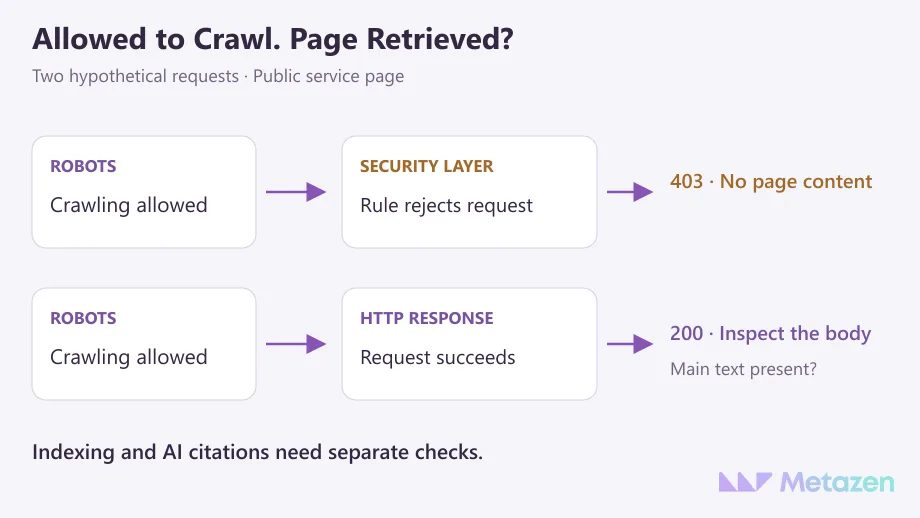
4. Verify Main Content and Indexing Conditions Separately
Does the response contain the service name, scope and explanation? A menu, loading indicator or sign-in screen does not answer that question. Ask the developer to point to the main text in the response for the selected page.
JavaScript-driven pages need a rendering check too. Google can process JavaScript; that does not establish support across all AI crawlers. Compare the target platform’s documentation with the response you have. Giving bots different claims from those shown to visitors does not resolve the underlying content problem.
For Google AI Overviews and AI Mode, eligibility as a supporting link requires an indexed page eligible for a search snippet. Examine noindex and relevant preview controls separately from whether the request succeeds. Google needs crawl access to read a noindex directive.
Wider indexing, redirect or template problems belong in a prioritized technical SEO review. If the page is accessible but leaves the customer’s question unanswered, work on clear answers with evidence and limits. When many existing pages need assessment, a GEO content audit helps decide which ones to revise.
5. Keep Evidence of Genuine Requests and Retest
A request claiming a crawler’s name may come from somewhere else. The User-Agent header is a stated identity, not proof of origin. Google’s verification guidance uses official IP ranges or reverse DNS followed by a matching forward lookup. Use each other platform’s current verification documentation for its traffic.
Putting a crawler’s name on your own request does not create a genuine crawler visit. That test can reveal how a particular request format is handled. It cannot, by itself, prove access for the real crawler or selection in an AI answer.
Keep the URL, timestamp, claimed agent, identity-check result, HTTP response, returned main content and any matching security rule in the task record. If no request appears in the logs, leave the cause open. It may not have arrived, the retention period may have expired, or another layer may hold the relevant record.
Consider a hypothetical service page where a verified request receives 403 despite robots permission. If investigation identifies an incorrect WAF match, adjust only the necessary scope. On a later verified request, check that the expected content arrives and that protected areas remain restricted. The task can then report a resolved access problem; it cannot promise an AI recommendation.
At Metazen, we favor technical tasks with a named owner and a result someone can check. After an access change, track AI answers in a separate observation record. A crawl log and a citation shown to a user are different pieces of evidence.
Find What Is Blocking Your Public Pages
If a crawler warning leaves you unsure whether the problem lies in your content or infrastructure, we can start with the affected URLs and their responses. Metazen’s technical SEO and software team can help prioritize the work and define how to check the result. Explore our GEO and AEO services to see how access checks fit alongside content preparation and visibility monitoring.
