

Your ad report shows more leads, yet the sales team has no extra conversations to follow up. Perhaps a form failed, a submission was counted twice, or the inquiries were outside your service area. Before adjusting the budget, find out what the conversion column actually counts.
A conversion is a customer action your business values and has configured measurement for. An online store might count completed purchases; a service business might begin with accepted quote requests. For the broader channel picture, start with how digital advertising works. Measurement planning asks a narrower question: what must happen before we record a useful result?
1. Choose the Business Outcome You Need to Measure
Consider a hypothetical company that provides maintenance services to other businesses. Someone submits a quote request. A team member confirms that the job fits the service offered. A contract is signed after the sales conversation. There are three stages in one customer's journey; adding them together would not give you three new customers.
| Stage | Acceptance Rule | What It Does Not Establish |
|---|---|---|
| Form Submission | The server accepts a valid inquiry. | Whether the lead is suitable or will buy. |
| Qualified Lead | The team confirms that the request fits the service. | Acceptance of the proposal or payment. |
| Sale | The business's defined sales condition is met. | The same profit or payment status for every order. |
If reliable sales data is not yet available to the ad platform, an accepted inquiry may be a practical starting point. Moving closer to revenue is useful only when the later event is recorded consistently. Decide who owns each update. A website tag cannot discover the outcome of a sales conversation on its own. If inquiries are recorded correctly but are a poor fit, use the ad lead quality checks to separate problems in traffic, the offer and sales follow-up.
Separate the outcome used for bidding from the activity you only want to observe. In Google Ads, a primary action can inform bidding when its goal is used by the campaign. Secondary actions normally appear in All conversions for observation. Custom goals are an exception: their secondary actions can be used for bidding too. Review the action and campaign goal settings together.
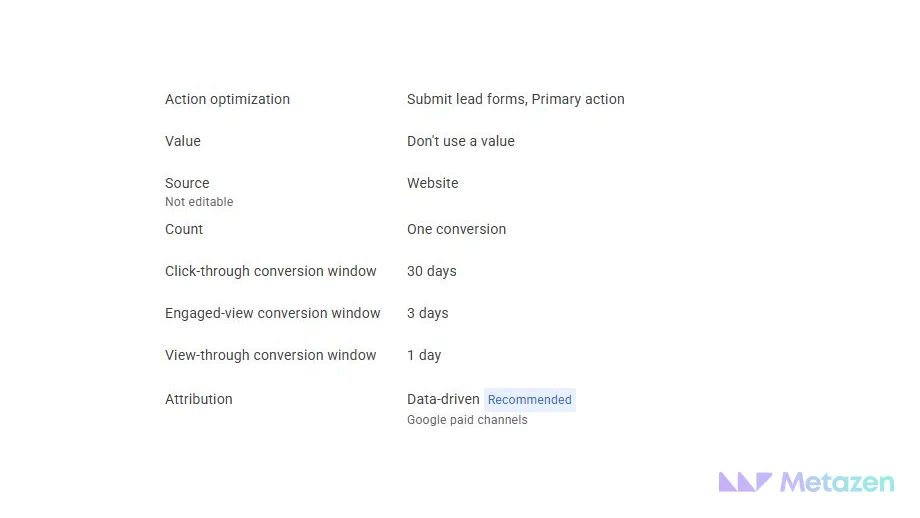
The screenshot shows a form action configured as primary. It does not prove that the form event fires correctly. Nor is the value setting a recommendation for every business. Read each setting against your measurement plan, then check what actually happens on the website.
2. Define the Exact Event Trigger
A submit-button click is easy to detect. It can happen even when a missing phone number causes the form to fail. If you want to measure inquiries, the condition should be the server accepting a valid submission. Confirm whether the success message and the actual processing of the inquiry represent the same result.
Write the requirement before discussing code: “Record an accepted quote request after validation and server confirmation. Do not record success for a button click or a validation error.” Add the event name, destination account and implementation owner. Developers and marketers can now check the same business rule instead of making separate assumptions.
A thank-you page is not always sufficient evidence. A page that can be opened directly, or fires the event again on refresh, may count an action that was never completed. Test access and repeat behavior before relying on a URL-based conversion.
You can measure a click on a phone link or messaging button. Call it a click, rather than a conversation or a sale. Without another signal, the website does not know whether anyone answered or accepted the inquiry. A clearly named early-stage event is more useful than a sales total built on assumptions.
Google's website conversion setup guidance distinguishes URL-based and code-based methods. Your event conditions and required parameters determine the approach. When you move on to campaign creation, use your definition to review the goal selection in our step-by-step Search ad setup walkthrough.
3. Set Counting, Deduplication and Value Rules
A functioning form can still produce an unreliable count. Double clicks, page refreshes or tags installed through both a plugin and a tag manager can repeat the signal. Work from the accepted submission record and agree with the implementation team which identifier should remain stable during a retry.
Google Ads offers One and Every counting options in the context of a conversion action and ad interaction. One can suit lead requests; Every can suit purchases where separate orders matter. Choosing One does not create a lifetime, cross-device count of unique customers.
Transaction IDs address a different problem. Google Ads can suppress a repeated ID for the same conversion action. If the same form is measured through both an imported GA4 conversion and a direct Ads conversion, do not assume the ID automatically combines the two actions. Check the transaction ID rule and the actions used by your campaign.
A Lead Value Is Not Recorded Revenue
A purchase can carry its actual amount and currency. A value assigned to an inquiry may instead represent an estimate of future business. If you use transaction-specific values, document their source. An arbitrary lead value should not appear in a report as money already earned.
For the maintenance company, accepted inquiries and signed contracts belong in separate columns. Combining them into a sales total would hide the work still needed between the two stages. Keep any lead-value assumptions, reference period and sample separate from confirmed sales amounts so that the team can review the estimate later.
4. Validate the Event and the Report Separately
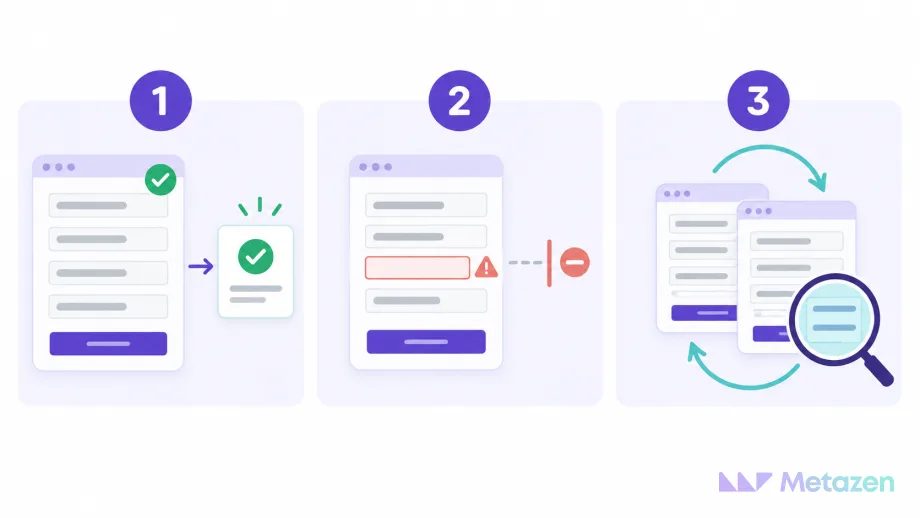
One successful submission is not a complete acceptance test. You need to know whether success is recorded when it should not be. A short shared checklist gives the developer and campaign owner something concrete to verify:
- Accepted submission: Did the form succeed, and did the expected event reach the intended account?
- Rejected submission: Did validation stop the process without sending a success event?
- Repeat attempt: Did a double click or refresh create an extra record for the same inquiry?
- Business record: Did the inquiry reach the team's system, and can the test entry be identified?
Tag Assistant helps inspect detected tags and outgoing events. In GA4, DebugView shows events and parameters from a debug-enabled device. Record the date, page and consent state used for the test. Data withheld because of consent settings is not automatically a broken tag.
Event delivery is not the same as ad attribution. A test made by opening the website directly can demonstrate that an event is sent. It does not necessarily create a conversion attributed to an ad interaction.
When reviewing results, match the column and date basis to your question. Conversions and All conversions have different scopes, while an ad interaction and its eventual conversion can fall on different dates. Google's conversion reporting documentation explains those distinctions. A mismatch between two dashboards is a reason to investigate, rather than immediately reinstall the tag. Once the measurement scope is clear, review how the agency report connects spend and outcomes to the next action.
Ask for a handover record containing the event definition, trigger, counting choice, value source and test outcome. “Tag installed” leaves too much unanswered. Retest the relevant scenarios when a form, checkout or website release changes the customer journey.
Build an Ad Report That Reflects Your Business
At Metazen, we connect advertising goals with the software flow behind them. We first agree on what makes an inquiry or sale complete, then align the implementation with that definition. Meet our marketing and development team and explore our paid advertising management service to see how we can help with goals, measurement preparation and campaign management. Bring your current conversion list and your definition of an accepted inquiry; they give us a useful starting point for deciding what to fix first.

