

Your sales team still explains the service scope over the phone, while the website sends inquiries to the wrong department. A new homepage image may do little to fix either problem. Yet a few dated photographs do not justify replacing a working navigation system, useful content and sound infrastructure. A website redesign decision starts with the task that is failing and the depth of change it needs.
Redesign can mean anything from updating copy and visuals to replacing page layouts, navigation or the underlying platform. Suppliers do not necessarily use the term in the same way. Understanding how web design connects appearance with use gives the discussion a better starting point than a choice of colors.
Turn a Complaint Into an Observable Problem
“Our website feels old” is an impression. “Someone looking for maintenance reaches the new-product sales form” is a problem you can investigate. The second statement identifies a page, a navigation choice and an outcome to examine.
Keep a short problem record: what is the visitor trying to do, where do they get stuck and what evidence supports the claim? A customer comment, a drop in an analytics report and an internal assumption are different kinds of evidence. Mark an unknown cause for investigation instead of quietly turning it into a requirement for the new site.
Leave room to choose the solution. “Visitors need to find the maintenance scope” describes a need. “Move the menu to the left” has already chosen an interface change without establishing whether it will help.
GOV.UK’s guidance on moderated usability testing describes observing realistic tasks without giving away the route. Ask people who resemble your intended audience to select a service or find how to make an inquiry. Record hesitation and unexpected choices. A few observations can reveal issues without representing every visitor.
1. Can Visitors Find the Right Service and Information?
A page can exist without being easy to find. The navigation label may use a term customers do not recognize, or the service description may be scattered across several sections. Sometimes one unclear label causes the trouble. Sometimes the content groups no longer match how people look for help.
Imagine an installation and maintenance business placing both services under “Our Solutions.” A visitor needing maintenance ends up in the product catalog. Start by examining the labels and routes. If the scope, project examples and inquiry form are disconnected, the page structure may need coordinated work.
Renaming one menu item is different from reorganizing the site. Nielsen Norman Group’s distinction between information architecture and navigation separates the visible controls from the content structure behind them. If people lose their way across several services, consider organizing pages around the questions visitors need answered.
2. Can People Finish What They Started?
Finding a service may only be half the job. A form that will not submit, an unclear error message or a required field hidden on a phone can stop the task. An attractive screen is not proof of a working process.
- Is it clear what each field asks for?
- Can someone understand and correct an invalid entry?
- When navigating by keyboard, is the focused link or control visible?
- Do instructions and controls remain usable when text is enlarged?
- Does the result shown to the visitor match the record received by the business?
W3C’s preliminary accessibility checks provide a starting point for keyboard use, text enlargement and form information. They do not replace a comprehensive accessibility assessment. One broken form does not establish the need to rebuild an entire site. If the same barrier appears in shared templates, the repair needs to address those components.
3. Does the Website Still Describe Your Business?
New services may have been squeezed into an old menu. Retired services may remain online, while project examples describe work you no longer want to attract. The visual design can look current even when the information has fallen behind the business.
Choose people who can verify the service copy, photographs and scope statements. Do not discard useful material simply because it has an old publication date. Check whether it is accurate and still answers a customer’s question. GOV.UK’s content maintenance guidance treats usefulness and identified problems as reasons to review and update existing information.
A new phone number and a few revised descriptions may only need a content update. If the business now serves a different audience whose questions do not fit the existing pages, content structure and page design may need to change together. A new brand identity can justify visual work, too. Replacing the technical platform still needs its own reason.
4. Do You Know What Makes the Site Slow?
“It is slow, so we should rebuild it” chooses a solution before establishing the cause. A late main image, a slow menu response and moving page elements can point to different problems. Identify the affected page, interaction and conditions first.
Google’s PageSpeed Insights documentation distinguishes real-user evidence from controlled lab tests. A low overall score is not an instruction to replace the whole site. If an investigation identifies an image, script or server issue, ask what addressing that cause would involve.
A problem can occur on many pages yet still have a bounded fix in one shared component. Widespread does not automatically mean a full rebuild. Prioritizing performance work by its effect on users helps establish whether targeted improvements are enough.
5. Can the Team Maintain and Change the Site Reliably?
Every service update needs a developer. A small edit breaks another page. New features depend on layers of workarounds. Each is a reason to investigate how the site is maintained, but distinguish a technical limit from a process problem. An editor may lack the right permissions or training; the content system may genuinely lack the fields they need.
Ask the technical team which required task the existing system cannot support, and why. Could a module update or shared-template repair address the issue? Is a dependency’s support status uncertain? GOV.UK’s discovery guidance calls for understanding technology and process constraints before committing to a new solution.
A platform that cannot support the required work reliably may need a broader replacement. In another case, editing permissions or a better content template may resolve the difficulty. Ask for a written explanation of the limit a rebuild would remove. Technical terminology should clarify the decision, not substitute for it.
Choose the Depth of Change, Not the Largest Package
The number of complaints is not enough to set priorities. An infrequent failure that blocks an inquiry can deserve attention before a common cosmetic flaw. Consider the task affected, confidence in the diagnosis and dependencies of the proposed change together.
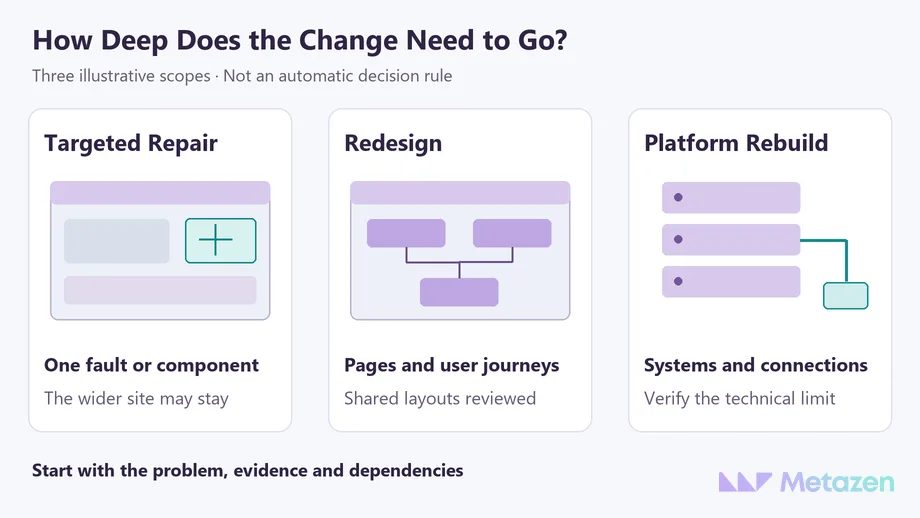
| Observed Problem | What to Establish First | Possible First Action |
|---|---|---|
| One service-page image appears late. | Does the delay come from the file or its loading sequence? | Adjust the image or its loading behavior. |
| Visitors from several services reach the wrong form. | Is the cause in the menu, content groups or a shared route? | Redesign the affected service journeys and shared layouts together. |
| The current system cannot reliably support a new service workflow. | Which technical limit prevents it, and could an update or module replacement resolve it? | Compare technical options, then scope a platform rebuild if justified. |
The table uses hypothetical examples rather than customer case studies. Add the affected page, observation, owner and success check to your own record. When the cause is uncertain, a bounded investigation may be the right first deliverable.
Keep the Parts That Already Work
A service description people can find, a reliable inquiry process and current project evidence are useful starting assets. Agreeing to a redesign does not mean removing them all. Put the things to retain on the same list as the changes.
If page addresses will change, plan the transition separately. Google’s guidance on site moves with URL changes covers mapping old addresses to new ones, appropriate redirects and monitoring. A visual redesign is not, by itself, a reason to replace every working URL. When reviewing the handover, use five checks for URL mapping, launch verification and search monitoring.
A new appearance does not guarantee a better result. If you expect more inquiries or search traffic, define the problem being addressed and the conditions of the comparison. Two homepage screenshots cannot establish that the experience improved.
Define the Redesign Scope Before Requesting Quotes
Give the team a short starting document: failed tasks, observed examples, elements to retain, expected changes and open questions. “Full redesign” does not explain which work is included in a price.
Once you have set out the purpose and responsibilities in a website brief, ask suppliers to quote against the same scope. Comparing design, content, development and ongoing responsibilities separately makes the differences between proposals easier to judge.
Let’s Establish What Your Website Needs to Change
At Metazen, a redesign conversation includes the tasks visitors need to complete and the limits of the existing site, as well as the visual examples you like. Our design and development team can help identify what to retain and which problems need coordinated work. Bring your website address and a few user tasks you believe are failing; that gives us a concrete place to start. Explore our web design service to see how we can help with planning and implementation.

