

If your contact form stops delivering inquiries to the sales team, who gets the first call? The agency that built the site, the hosting company and your content editor may each see a different part of the problem. Website maintenance gaps often emerge when everyone assumes someone else owns the task. Agreeing on responsibilities before an incident gives the investigation a clear starting point.
Website maintenance covers planned checks and fixes that keep a live site’s software, content and user journeys working and current. During a build, web design defines what visitors should be able to do. After launch, maintenance checks whether they can still do it as the site changes. The split between the business and its technical team depends on the platform and the agreed service.
1. Assign Ownership of Accounts and Renewals
List the domain registration, hosting, content management system and paid licenses. For each service, record where it is held, the business contact with authority over the account, who has technical access and when renewal is due. Keep passwords out of a shared task spreadsheet; agree on a secure way to grant and hand over access.
Finance might make the payment while another colleague watches renewal notices. Someone still needs to confirm completion. ICANN’s renewal guidance recommends tracking the expiry date and keeping payment details current when using automatic renewal. Check the terms for your registrar and domain extension rather than assuming every registration follows the same rules.
When a staff member or agency leaves, review access as part of the handover. Confirm that the business has an authorized account, a working recovery method and a new owner before removing the outgoing person’s access. Record which permissions remain and which have been withdrawn. If a custom application changes hands too, check the deployed source revision and the permissions needed to rebuild it during the same session.
2. Name Who Applies Updates and Who Checks the Result
A running server does not tell you whether every part of the website is maintained. The host may operate the infrastructure while another team handles the CMS, theme, plugins or custom code. AWS’s shared responsibility model illustrates how the division changes with the service being used. Read your own provider’s inclusions before applying that example to your website.
The technical owner should assess the reason for an update, its dependencies and the recovery route if it fails. The business contact needs to know whether planned work could affect inquiries or content entry. Neither postponing every update indefinitely nor applying changes without considering their effect is a workable policy.
For WordPress, start with the backup preparation described in the official update guidance. Then test the affected function: navigation after a menu change, or submission and delivery after a form plugin update. If the site slows down, investigate the affected page and user task before changing settings at random.
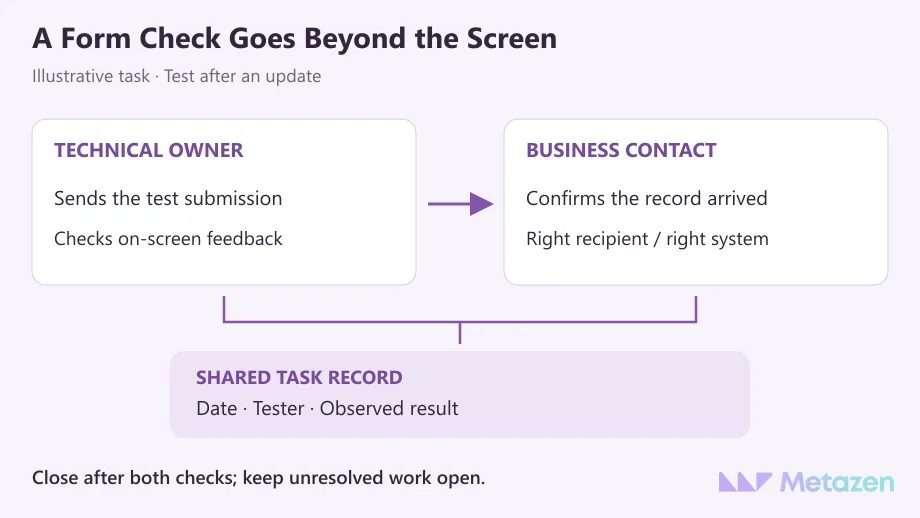
A useful maintenance record says more than “updated.” Include the component, date, person who tested it, observed result and unresolved work. If the technical change is complete but business confirmation is pending, leave the task open.
3. Give Backup and Recovery Checks Separate Owners
A successful backup job does not prove that the website can be restored when needed. Ask what is copied, where the copy is kept, how long it is retained and who can access it. For a database-driven site such as WordPress, copying the website directory may be incomplete: the WordPress backup documentation distinguishes files from the database.
Assign the recovery check explicitly. The technical team can test a restore in a suitable environment separate from the live website. A business contact can confirm that the necessary pages, images and sample records are usable. AWS’s recovery testing guidance calls for checking the restored data, rather than treating the restore operation alone as proof of success.
Choose backup frequency around how quickly the data changes. A brochure site with occasional copy edits has different recovery needs from a site collecting requests or orders throughout the day. The business should explain how much recent work it could recreate and how long the affected activity could stop. The technical approach needs to meet those requirements.
Restoring an older backup can roll back inquiries or content changes made afterward. Before restoring the live site, identify the affected records and agree with the technical owner how to preserve them. Having a backup file does not guarantee a recovery without data loss.
4. Share Responsibility for Content and Inquiry Delivery
The business usually knows first when a service area changes, a phone number is replaced or an offer ends. A technical team cannot infer a change it has never received. The person confirming the information and the person publishing it may be different. Add an owner and review date to your page and content inventory so the work can be followed without searching through scattered messages.
GOV.UK’s guidance on managing existing content recommends regularly assessing published information. For a business site, connect checks to real events such as an offer ending, a service changing or a team handover. A calendar reminder should not be the only way a change reaches the editor.
A content editor does not necessarily need technical administrator access. WordPress roles and capabilities, for example, separate publishing permissions from software administration. Grant access according to the work a person needs to perform.
Check both ends of a contact request. W3C’s form notification guidance describes clear feedback for success and errors. Beyond the on-screen result, confirm that an authorized test submission reaches the agreed recipient or system. Use an unmistakable test record with no unnecessary personal information.
5. Define How Problems Are Reported and Closed
A broken inquiry form and a request to replace a photograph do not have the same urgency. Ask the person reporting a problem to include the page URL, time, action taken and result observed. While the technical team investigates, the business can explain which activity is affected. Keep an untested diagnosis such as “the server is broken” out of the confirmed facts.
Agree on the support channel, working hours, expected first response and escalation contact when the usual person is unavailable. A first response is not a completed fix. If the work depends on a third-party investigation or additional access, keep that dependency visible. Do not plan on every fault being resolved within the same period.
After a fix, repeat the reported task and have the named reviewer confirm closure. Recurring faults may need a separate investigation and preventive work. If the current platform cannot support the required activity, compare targeted fixes with a wider website redesign instead of letting a maintenance request quietly become a rebuild.
Keep the Responsibility Record Short and Usable
The allocation below is an illustrative starting point for a business website. One person can hold several roles. Fill in names, review intervals and scope according to your own arrangement; “the agency” or “us” is less useful than a named contact or accountable team.
| Task | Who Follows It Through | Completion Evidence |
|---|---|---|
| Domain Renewal | Business account owner, working with the payment contact | Updated expiry date and completed renewal record |
| Software Update | Named technical maintenance owner | Version, affected-function test and unresolved issues |
| Backup and Recovery | Technical owner, with business data verification | Backup record plus a dated restore and data check |
| Content and Inquiries | Information owner, publisher and inquiry recipient | Approved content, submission result and confirmed receipt |
| Incident Follow-Up | Technical investigator and person accepting the result | Repeated task, observed result and closure record |
Add the next check or the event that triggers work to each row. Use the same record when discussing service scope: comparing maintenance and support within website quotes can expose tasks neither party has accepted. An excluded task has not silently become someone else’s responsibility.
Let’s Clarify Who Looks After Your Website
Your site address, the services it uses and a few examples of recurring problems are enough to start the conversation. At Metazen, we assess the technical setup alongside the actions visitors need to complete. Meet our team with web development and server management experience, then explore our web design and development service to discuss the checks your site needs, the confirmations your business provides and where maintenance becomes additional development.

