

The outgoing agency has sent a link to the quoting app. Tomorrow a new engineer needs to fix a discount. Which revision should they open? Can they pull its private packages under a company account? Where can they test the change without emailing a real customer? Ask the incoming engineer to take the keyboard while the outgoing team is still in the room.
A software project handover gives the next team the materials and permissions to run a particular release. Start with the scope and acceptance criteria agreed before development. A custom quoting module, a licensed PDF library and a transactional email subscription each need a different entry in the handover record. Once you have separated the custom application from its ready-made components, identify what the recipient can maintain, what they can use under a license and who controls each service account.
1. Match the Repository to the Deployed Release
Ask the outgoing engineer to open the last successful deployment record. Read the application name, environment and revision together. In Git, a commit ID identifies a specific recorded change. A release tag gives people a convenient name for it. Save the full commit ID alongside that tag and the build or deployment record. A new commit can land on the main branch before the support team gets its first ticket.
We ran a small, local pricing example to see the difference. At the tag v1.0 the program applied a 10% discount to an amount of 100. We then changed the discount on the main branch to 20%. From a fresh clone, running the program produced 80. Checking out the handover revision, 1fd4ffa, and running the same input produced 90. Both copies ran successfully. Only the tagged one matched the release we had chosen to accept.
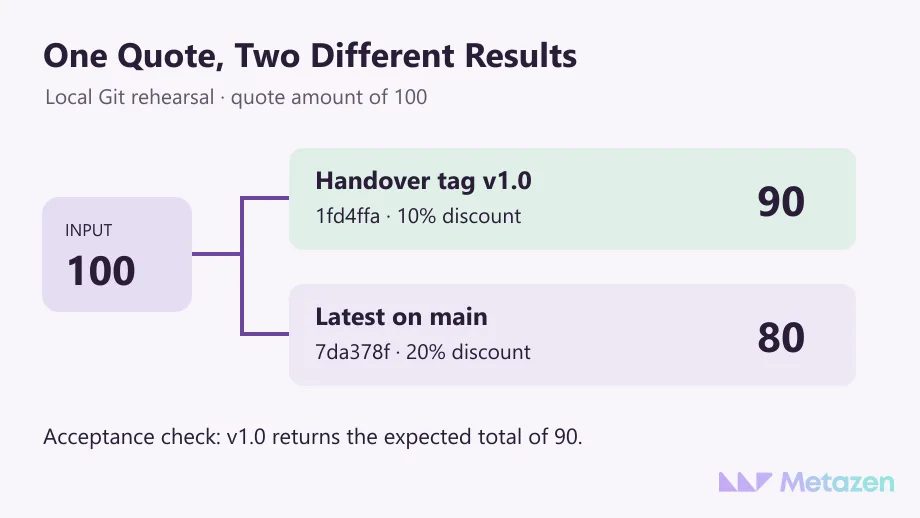
If you receive a ZIP, establish how it was produced. A standard GitHub source archive contains the files at the chosen revision. For history, request access to the repository. Open a representative large asset if the project stores large files separately. Check the incoming account can fetch each private package or submodule needed for the build.
2. Put Each Account Under the Right Owner
Have a company administrator sign in under their own identity. Can they invite a teammate to the repository? Where do billing notices and account recovery messages go? Someone who can edit a quote in the application may have no authority over the cloud subscription that runs it. Record the administrator, day-to-day operator and backup contact for each service the business depends on.
| Asset | Person demonstrating access | Evidence to record |
|---|---|---|
| Source repository | Company account administrator | Located the repository under the receiving organization and reviewed member roles. |
| Packages and deployment | Incoming engineer | Fetched the private package and deployed the selected revision to staging. |
| Email provider | Integration owner | Sent a sample message to the test inbox using a sandbox credential. |
| Recovery access | Designated backup administrator | Verified their own access and located the account recovery contact. |
Check the platform and the method used to move the project. A GitHub repository transfer can retain collaborators, deploy keys and service hooks. A GitLab file export leaves out CI/CD variables, webhooks and registry images. An invitation accepted on Monday tells you little about whether Friday’s scheduled job can still fetch its image. Test the dependency in its new home.
Keep credential values out of the handover record. List the vault entry, the owner and the date checked. For a production service credential, identify the jobs that use it, provision a replacement through the approved channel and verify the consumers before retiring the old key. Coordinate the sequence with the provider. OWASP’s secrets management guidance covers access, rotation and revocation.
3. Let the Receiving Engineer Run the Setup
Give the engineer a clean staging environment, the release reference, runtime versions, dependency manifests and a configuration example. Use synthetic records. Route outgoing mail to a test inbox and payment calls to a sandbox. If a step needs a file from the previous engineer’s laptop, pause there. Add its name, approved source and purpose to the setup notes before trying again.
Pick one short business workflow with a visible outcome. For a quoting app, create a quote, read the discounted total, generate its PDF and send a test notification. A working login by itself tells you little about background jobs. If the notification fails, ask the recipient to locate the failure record. The owners and failure paths agreed for the integration should tell them who can fix it.
A familiar install command can expose a hidden dependency. In an npm project, a clean install with npm ci stops if the package manifest disagrees with its lock file. A developer machine with cached packages can conceal missing registry permissions. Use the credentials a new teammate would receive and note the result in the release record.
4. Record What Passed and Who Owns the Gaps
“Setup complete” gives the next support engineer very little to go on. A more useful entry might read, “Staging, v1.0: a quote for $100 saved at $90. PDF opened. Email delivery awaits a sandbox role.” Close the two checks you witnessed. Leave email open and name the person who will grant the role, the date for a retest and the engineer who will confirm delivery.
Keep a short runbook where the recipient can find it from the release. Include startup instructions, configuration names, sample data, the last successful deployment and the recovery procedure. A database schema change may prevent the previous application version from running against the new database. Ask which recovery steps someone has rehearsed and what still needs a separate test.
Give the incoming engineer the last question. “If the quote PDF fails tomorrow morning, which log will you open first?” Have them find it under their own account, identify the release and show how to contact the person responsible. A missing permission is cheaper to discover with both teams present.
Check the handover against the testing and support items in the development quote. If the application depends on a public website, assign domain renewals, website updates and form checks to the people handling ongoing website maintenance. Give each open item a home after the handover meeting ends.
Plan the Handover With the Team Taking Over
Bring one critical workflow and your current asset list to a discussion with Metazen’s software team. We can help identify the release to test, the access the receiving engineer needs and the result your business expects to see. Explore our custom software development service if you need a team to take over an application or continue its development.
