

A rep sent a proposal last week. When the customer calls again, the notes are in a colleague’s file and nobody knows who promised to follow up. Choosing a CRM starts with making that ordinary interaction easier to manage: the customer’s position, the promise made and the next person responsible should be visible together. Bring your own sales process to the demo so you can judge how the system handles the work.
CRM stands for customer relationship management. CRM systems help organize information and interactions involving customers and prospects. The questions here focus on choosing one for a sales team. A company record and a sales opportunity serve different purposes: one customer can have several deals in progress, each with its own status and next action.
Bring a Sales Scenario to the Demo
Consider a fictional equipment supplier. One customer requests quotes for two facilities in the same month. The contact person is the same, but the equipment requirements and decision dates differ. Can the CRM keep both opportunities linked to the company without mixing their progress? If one deal is lost, does the other remain open?
Prepare a sample with sensitive details removed, from the initial inquiry through the conversation, proposal, follow-up and outcome. If you are still deciding whether a spreadsheet has become the problem, first separate a fixable spreadsheet process from a need for software. Inconsistent status labels alone may call for a clearer working convention before a new system.
Put the intended user in control. Ask a sales rep to sign in with their normal role, record the conversation and hand the next task to a colleague. A presenter completing the steps with an administrator account does not demonstrate how the team will use them.
1. What Actually Moves a Deal to the Next Stage?
“New,” “in progress” and “complete” can look sufficient until people use them differently. Did the rep complete a phone call, send a proposal or secure an accepted order? Give each stage an entry condition the team can recognize. Sending a proposal is not evidence that the deal has been won.
HubSpot’s pipeline documentation, for example, distinguishes open deal stages from won and lost outcomes. Ask whether the candidate product supports your stages and the information needed at each transition. Confirm availability in the plan you intend to buy rather than assuming every demonstrated feature is included. Qualifying a lead as a sales opportunity is an earlier decision than closing the sale.
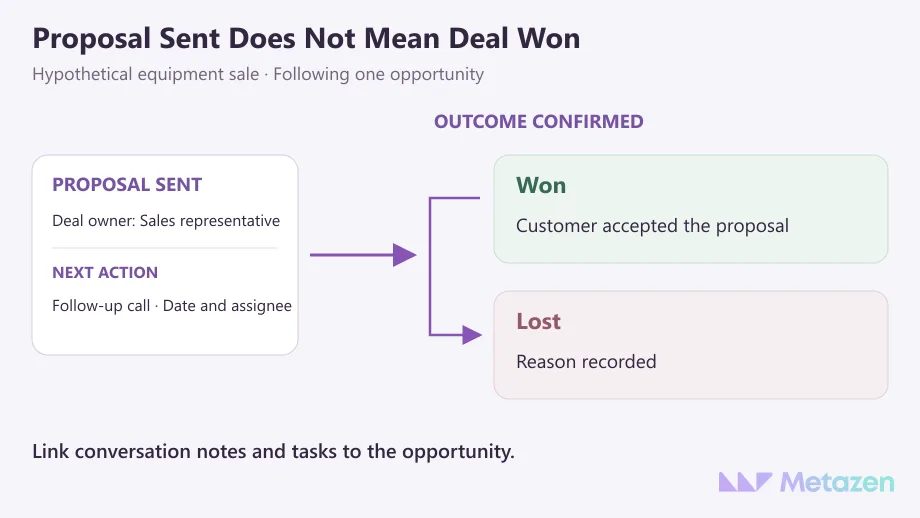
For a lost opportunity, a short reason is more useful than an unexplained closed status: the purchase was postponed, the offered scope did not fit or another proposal was selected. Choose categories that reflect your business. If advertising brings inquiries the team cannot serve, a new CRM screen will not fix the mismatch; investigate where leads are being ruled out and why.
2. Who Owns the Record and the Next Action?
An opportunity can have an owner while its follow-up date remains empty. Look for the person responsible for the record, the next task, its due date and the person assigned to carry it out. A manager should be able to identify unattended work without reading every conversation note.
Try a handoff during the demo. The usual rep is out of the office; a colleague needs to return the customer’s call. Can they find the relevant history and take responsibility for the task? Does an old reminder remain with the absent rep? Agree on a working procedure that prevents both people calling independently without realizing the other is handling it.
Record ownership and access permission are separate decisions. Someone who edits their own deals may not need permission to export the entire customer list. A product can manage record and activity access separately. Test the actual role boundaries, including what a colleague should be unable to see or change.
3. Where Will the Required Data Come From?
You may need the CRM to connect with a website form, email or accounting application. Follow “we have an integration” with a request to see one sample record. Does the project note arrive with the name and email address? When the same company makes another inquiry, is it handled as a new opportunity linked to the existing company, or as an unrelated duplicate?
For an equipment supplier, the CRM might hold proposal status while accounting owns payment status. If the latter appears in the CRM for reference, a sales rep should not inadvertently overwrite the accounting record. Data sync documentation separates direction, field mapping and conflict handling. Those are specific capabilities to verify, beyond spotting an application logo on an integrations page.
At selection time, establish whether the required fields and operations are supported. When the connection becomes a development project, work through data ownership, transfer direction and responsibility for failures in more detail. You do not need to design the whole integration during a sales demo, but a critical unknown should remain an open question until someone verifies it.
4. Can the Team Complete Everyday Tasks?
Include the people who enter records, handle conversations and review results. Give each person a short task. When they hesitate, observe what is missing before the presenter steps in to finish it. A polished demonstration and a usable daily workflow are different pieces of evidence.
| Trial Task | Result to Look For |
|---|---|
| Create a second proposal for one company | The company relationship stays intact; each deal has its own status and dates. |
| Hand a conversation to a colleague | The new owner can find the relevant history and their next task. |
| Correct a mistaken stage change | The correction process and its effect on reporting are understandable. |
| Review pending proposals | Stage, owner and follow-up date show which records need action. |
| Export sample data | The required fields and relationships can be checked in the output. |
Adapt the tasks to your operation; they are a starting point, not a universal acceptance standard or a numerical score. If reps work in the field, have them add a visit note on a phone. A desktop demo cannot establish whether the same task is practical on the device they actually use.
Putting a CRM into use involves data preparation, testing, training and support as well as configuration. When a user struggles, distinguish a training gap from an unnecessary required field or an unsupported step. More training will not repair a workflow that prevents the job from being completed sensibly.
5. Are the Running Costs and Exit Conditions Clear?
Request quotes for the same number of users, required functions and billing period. Separate subscriptions from setup, data cleanup, integrations, training and ongoing support. Published pricing structures may distinguish editions, billing commitments and support add-ons. A starting price is not a quote for the complete work your business needs.
Ask for a sample export before committing. A file containing names and phone numbers may still omit the opportunity links, conversation notes or historical changes you expect to keep. For example, HubSpot’s export documentation distinguishes current record properties and associations from activity exports. Establish how the information you need can be retrieved from the product you are evaluating.
An export button is not proof of complete portability. Open the sample file and check whether you can reconnect the company, its two opportunities and the required notes. If obtaining the full set needs another tool or paid assistance, include that requirement in the decision.
For a subscription service, consider the responsibilities that remain with the business using it. A ready-made CRM may cover the work without custom development. If an essential rule remains unsupported, compare a standard product, adaptation and custom software against the same need.
Plan a CRM Setup Around Your Sales Team
At Metazen, we begin software planning with the work: who creates the record, who moves it forward and which system holds the authoritative information. If you have shortlisted CRM products, bring a sales example with sensitive details removed and a list of unresolved requirements. Our software and integration team can help distinguish configuration work from a need for development. Explore our custom software service to see how we approach requirements, implementation and the connections between systems.

