
Two ecommerce packages can both promise inventory management. Yet one may leave a marketplace listing unchanged when the last medium sweatshirt sells, or record a return without sending the customer’s money back. A platform comparison becomes more useful when you follow an order through the business instead of counting features on a pricing page.
An ecommerce platform provides the software for presenting products, handling baskets and payments, and managing orders. The storefront design is only part of the system. With a hosted subscription service, you use the provider’s application. With a self-hosted open-source solution, you arrange the technical work needed to maintain and adapt it. Custom development is another option, but it needs a specific unmet requirement to justify the extra work.
Give each candidate the same demonstration order. Our hypothetical clothing store sells a sweatshirt in three colours and four sizes. A customer buys two sizes and returns one. Write down the expected record and the person responsible at each stage. The scenario is a proposed evaluation method, not a test we have run on a client’s store.
1. Can You Sell Your Actual Product Options?
Catalogue size alone says little about product complexity. A variant is a sellable combination of options such as colour and size. If the store offers every combination of three colours and four sizes, the sweatshirt has 12 variants. Each may need its own stock code, price and availability.
WooCommerce’s variable product documentation shows how prices, images and inventory can be managed by variation. During a demo, go beyond clicking a colour swatch: make one size unavailable and check its basket behaviour while the other sizes remain on sale. Bundles, personalisation and subscriptions need their own demonstrations if they are part of your business.
Managing a product and helping someone find it are different requirements. Place categories, filters and product details within a page structure built around customers’ questions. Editable titles and product fields give you working tools; deciding what to improve first still calls for prioritising category and product pages for search.
2. Can Customers Complete the Payment You Need?
“Accepts cards” leaves several questions unanswered. Confirm the payment provider available to your business, the currencies you intend to sell in, any required local payment or instalment options, and the refund process. A method listed by a platform may not be available to every business or in every country.
See whether checkout stays within the store or moves to a payment provider’s page. Ask about a declined or abandoned payment as well as a successful one: what does the customer see, which order status is recorded, and how does another attempt proceed? Use the provider’s test environment. Customer card details and real charges are unnecessary for a demonstration.
Separate the payment processor’s charge from an additional platform transaction fee. Shopify’s third-party payment documentation, for example, distinguishes checkout arrangements and fee conditions. Confirm current charges and exceptions for the actual plan, provider and business location; a headline rate from another market may not apply.
3. Who Handles the Order, Delivery and Return?
The employee packing an order may not be allowed to approve a refund. Review the demo using the roles staff will actually have, rather than relying on an administrator account. Which orders can the warehouse worker see? Where is the shipping label created? How does tracking reach the customer? If an extra app handles a required step, record the app and its owner in the scope.
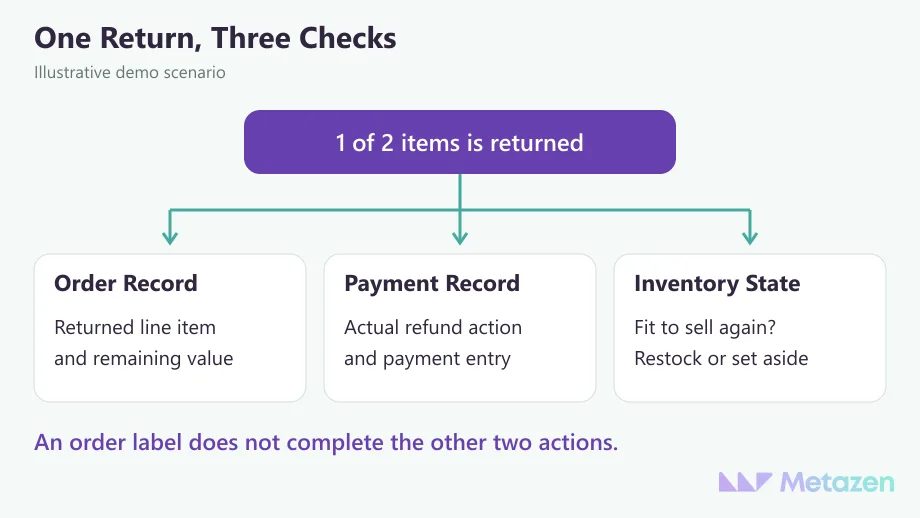
Return one item from the two-item sweatshirt order. Inspect the remaining order value, the payment refund and the returned item’s stock state separately. A damaged garment may not belong back in sellable inventory. The business should define the required outcome before anyone treats an automatic stock adjustment as a successful test.
A “refunded” label does not prove that money moved. A manual refund in WooCommerce records the refund, while returning the money requires a separate action. Automatic refunds depend on a compatible payment gateway. Check the payment record and the stock movement rather than accepting the order label alone.
4. Do the Required Records Reach Your Other Systems?
An integration connects systems so they can exchange data. Your store may need links to accounting, inventory, shipping or marketplace software. Turn “integration available” into a concrete question: which product identifier, order fields and refund details move, and in which direction?
Seeing an order arrive is only the start. Ask to see the chosen size, discount and partial refund in the destination record. Establish who notices an unsent order when the connection stops and who restarts processing. Finding an unsupported operation during platform selection is cheaper than discovering it after a detailed integration project has begun.
Shopify’s B2B integration documentation explains that some apps do not fully support company and catalogue data. An app-store badge cannot demonstrate your field mapping. Once a candidate meets the requirement, work through data ownership, transfer direction and failure handling with the technical team.
5. Are Running Costs, Maintenance and Exit Conditions Clear?
A monthly subscription is not the complete cost of running a store. Compare the same period and sales assumptions, separating setup, theme, paid apps, hosting, payment costs, migration and support. Some costs are included and others do not apply to a particular model. Even WooCommerce’s own cost explanation separates its free core from hosting, payment processing and extensions.
Free software does not mean a store costs nothing to operate. A subscription does not mean the provider will fix every third-party app or customisation. The WooCommerce update guidance calls for backups, staging checks and verification of store workflows. Agree who owns each maintenance task before assuming that a gap in the quote is somebody else’s responsibility.
Check the exit route before you buy. A Shopify product CSV export does not include the image files or collection membership. An “export available” answer therefore needs more detail. Inspect representative product, customer and order records with their relationships, and ask how you will retrieve the required images and history.
| Requirement | Evidence to Request in the Demo | Decision Record |
|---|---|---|
| Variant inventory | One size sells out while the others remain available. | Built-in feature or additional development? |
| Partial return | Payment, order and stock records reflect the intended outcomes. | Automatic actions and manual tasks. |
| Existing system connection | Required fields reach the correct place in a sample order. | App, plan condition, owner and cost. |
| Leaving the platform | Sample product and order exports can be read. | Missing data, extra tools and migration work. |
Mark each requirement as “needed at launch”, “can come later” or “not needed now”. Do not offset an unmet launch requirement against a low subscription price. Until the missing work has a method, cost and owner, the comparison is incomplete.
Attach the resulting list to the quote. Check that suppliers are pricing the same product structure, connections and support period by comparing website proposals on a common scope. Favour a workable fit that your team can maintain over the longest feature list.
Let’s Turn Your Store Requirements into a Practical Scope
If you already have platform candidates, bring a few representative products, the systems an order passes through and the tasks staff still complete by hand. At Metazen, we consider customer steps, data flow and maintenance alongside the storefront. Our web and software team can help separate existing features from work that needs adaptation and shape the design and development scope through our web design service.

