
Your new service page is live and opens in a browser, yet you cannot find it on Google. Before rewriting the heading or submitting another indexing request, establish what is missing. Does Google know the URL? Has it indexed the page, chosen a different address, or simply not shown it for the query you tried?
Indexing means Google analyses a page and stores information about it in its search index. Fetching the page and selecting it for a search are separate stages. Our explanation of how SEO works covers the wider process. Here, the task is narrower: identify the evidence for one URL and turn it into an action someone can own.
1. Inspect the Index Record for the Exact URL
Open the relevant Search Console property and paste the full page address into the inspection field. Check the protocol, www variant, path and parameters. Similar-looking URLs can have different outcomes. Save the result and last crawl date shown in URL Inspection.
If the page is indexed, broaden the question beyond indexing. In the Performance report, review the page, queries and date range, with the country and device filters in view. Impressions and clicks measure different things. Weak visibility for a target query does not establish that the page is absent from the index.
A site search is not a complete inventory. Failing to find a URL with site: does not prove that it is unindexed. Google documents limits to the operator; use the inspection record to investigate an individual URL.
Replace a note such as “not showing” with the full URL, expected query and observation date. “Maintenance service page indexed, no impressions for the target query” describes a different job from “Google has not discovered the maintenance service page.”
2. Compare the Recorded Finding with Current Access
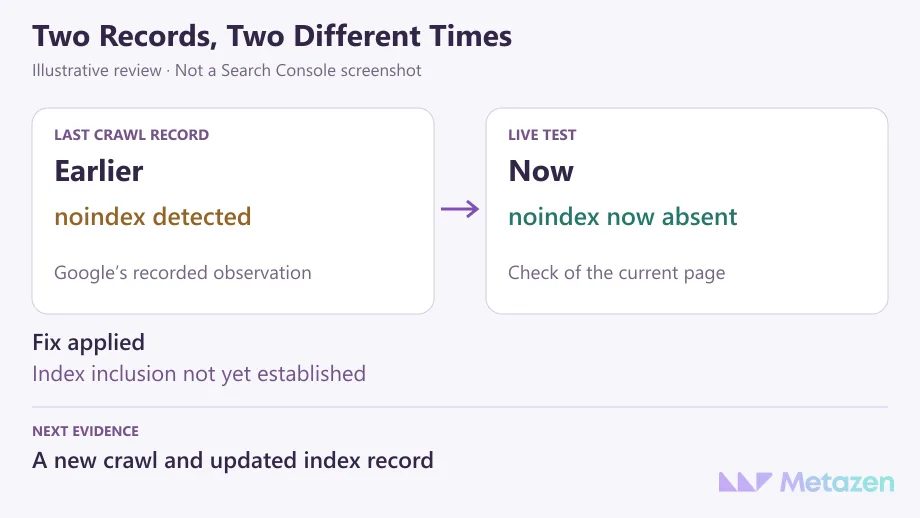
The recorded crawl may predate your fix. A live URL test checks current access; it does not replace the index record or establish inclusion. Read the change date, last crawl and live result together.
Google’s minimum technical requirements include crawler access, a successful response and indexable content. A page you can see while signed in may not be public. Give the developer the exact address, test time and reported response when an access check fails.
- If the server or security layer blocks the request, investigate the rule involved.
- If the URL redirects, check that the final destination serves the intended content.
- If a successful response contains an empty template or error message, investigate why the main content did not load.
An HTTP 200 response is not enough on its own. Google’s crawl troubleshooting guidance helps direct the investigation towards access and the content actually served. When several pages share the same fault, use technical SEO priorities to assess impact and dependencies. Investigate a common template before commissioning separate patches for every URL.
3. Establish Why an Indexing or Crawl Restriction Exists
Noindex asks a search engine not to include a page in its index. It can appear in HTML or an HTTP response header. Robots.txt controls crawling instead. Google needs access to read a noindex instruction; the two controls are not interchangeable.
A staging restriction left on a public service page calls for a different decision from an intentionally excluded thank-you page. Find out who owns the setting and why it exists. If the problem began after a redesign, review the SEO launch checks for a website migration.
Do not expose private pages to reduce an exclusion count. Customer accounts and administration areas still need access protection. Keeping a page out of search and protecting confidential information are separate jobs; noindex is not a password.
4. Examine the Address Google Chose
A canonical signals a preferred address among similar pages. Google may choose a different URL. Open both pages when the choice is unexpected and compare their content. A successful live test does not verify Google’s canonical selection.
Consider a hypothetical maintenance service with identical pages at an old and a new address. Navigation points to the new URL, the canonical points back to the old one, and the sitemap lists both. The useful question is not how many indexing requests were sent. It is which page should remain and which address the site should consistently reference.
Align canonical and other URL signals with the intended address. Selecting the main page instead of a parameterised copy can be the right outcome. When two pages meant to answer different needs are almost identical, revisit the purpose of each page before treating a tag change as the whole solution.
5. Choose the Next Action from Discovery and Crawl Evidence
The statuses in the Page indexing report describe different stages. A URL waiting to be crawled is not in the same position as one already fetched but left out of the index. Treat the status as the start of an investigation.
| Observation | First Investigation | Assumption to Avoid |
|---|---|---|
| URL unknown to Google | Relevant internal links and the sitemap entry | Publication does not prove discovery. |
| Discovered, not yet crawled | Access, server conditions and a later crawl record | Do not assume the content has been read. |
| Crawled, not indexed | Served content, indexing instructions and similar pages | The label alone does not diagnose a penalty. |
| Expected alternate URL | Whether the intended main page was selected | Every duplicate does not need separate inclusion. |
Do not leave a useful page isolated simply because it appears in an XML file. Add clear links from relevant content. If its place in the visitor’s journey is uncertain, review your website page structure. A sitemap helps discovery; it is not an acceptance list.
Keep a short change record: affected URL, observed problem, action taken, owner and evidence to check next. “Removed accidental noindex from the service page; absent in the live test; awaiting a new crawl record” is more useful than “SEO fixed.” It tells the next person what happened and what remains unresolved.
After a necessary fix, you can request another crawl. Processing can take days to weeks; repeated requests do not make it faster. Track implementation, Google’s reassessment and query visibility separately. If the available records do not explain the problem, extend the missing-page investigation to other possibilities, including manual actions and security notifications.
Let’s Find What Is Holding Your Page Back
At Metazen, we start with the page you expect customers to find and the evidence available, before recommending more content. An access restriction, an unexpected URL choice and a mismatch with the search query require different work. Meet our technical SEO and software team and explore our SEO service for an investigation that leads to a defined next step.

